
You are here:
Apex Interface Implementation Limitations and Error Codes
When determining the availability of service resources, limitations apply when you use a custom Apex class to check external calendar events.
Required Editions
| Available in: Lightning Experience. |
| Available in: Enterprise and Unlimited Editions |
Limitations
- The implemented Apex class inherits the Apex platform limits such as CPU time and heap size.
- The LxScheduler.ServiceResourceScheduleHandler interface expects a response (unavailable time slots) from the implemented Apex class within 10 seconds. If no response is received within 10 seconds, the request times out and the appointment booking fails.
- The implemented Apex class must return the unavailable time slots in GMT time zone.
- If your custom implementation returns an exception, the entire operation fails.
- Any debug logs are created in user context.
- If the implemented class doesn’t return information about a requested service resource, then Salesforce Scheduler assumes that the service resource is available throughout the requested time slot.
- As long as the Apex class is associated with the Check External Systems for Resource Availability scheduling policy rule, asset scheduling, capacity based scheduling, and concurrent scheduling don’t work.
- As long as the Apex class is associated with the Check External Systems for Resource Availability scheduling policy rule, if an error occurs during appointment creation, the Review Service Appointment page shows a generic error message instead of a message specific to the problem.
- If the external calendar system is down, you can’t schedule appointments unless you disassociate the Apex class from the Check External Systems for Resource Availability scheduling policy rule.
- If you plan to use the provided flow screen components to build a custom appointment flow, you must use the standard service resource and appointment time components to get resources and the Save Appointment action to create appointments.
- By default, the Inbound New Guest Appointment standard flow template doesn’t work with a
scheduling policy that has a custom Apex class associated with it. The reason is callouts
aren’t allowed after DML operations in the same transaction because DML operations result in
pending uncommitted work that prevents callouts from executing. For more information, see this
knowledge article.
To resolve this problem, edit the Save Appointment action in the Inbound New Guest Appointment flow. Expand Advanced, and under Transaction Control, select Always start a new transaction.
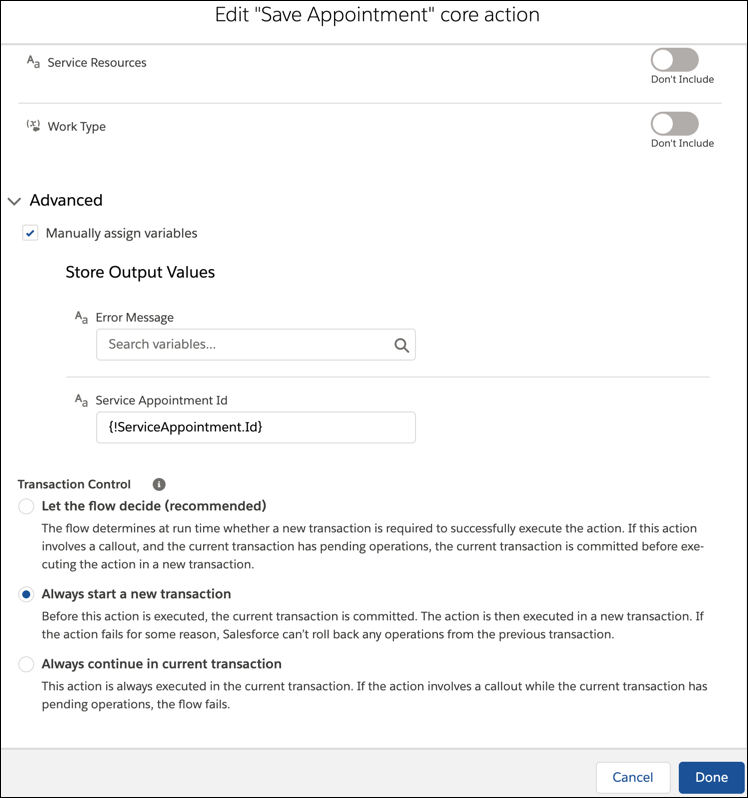
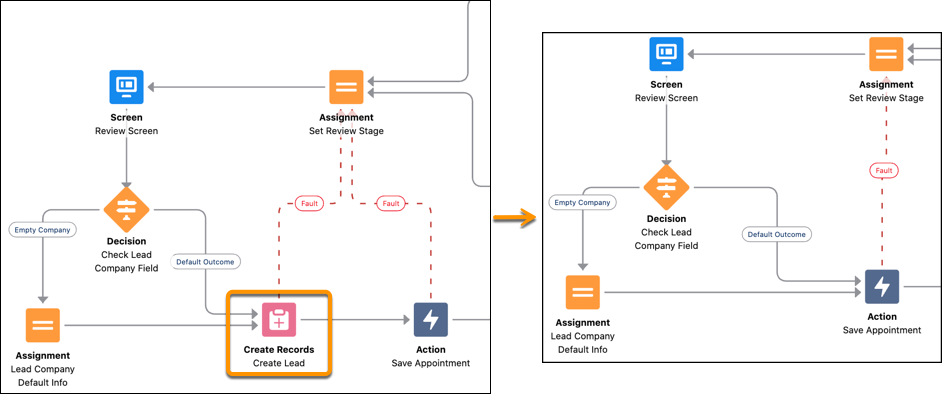
Then, delete the Create Lead node, and connect the Decision and Assignment nodes directly to the Save Appointment action node. Passing the Lead object, instead of lead records, to the Save Appointment action node ensures a complete rollback when something goes wrong during the guest appointment scheduling process. Previously, the appointment record was rolled back, but the lead record that was created during the process remained in the system, resulting in duplicate leads.
- When working with Appointment Distribution feature, Salesforce Scheduler doesn’t consider external calendar events out of the box when calculating the utilization score. To calculate the utilization score, write a custom apex to support external calendars. The limit to show the 10 least occupied eligible resources is also applicable when you send an Apex read call to external calendars.
Error Codes
If something goes wrong with your custom Apex implementation, users get this error message when scheduling an appointment.
Something went wrong. Ask your admin for help: <error
    code>
The error code varies depending on the cause of the error.
| Error Code | Problem | Recommended Steps |
|---|---|---|
| 40001 | The Apex class doesn’t conform to the provided interface. | Ensure that the Apex class implements the LxScheduler.ServiceResourceScheduleHandler interface and has a parameter-less constructor. |
| 50001 | An error occurred when executing the Apex class. | Check your debug log for more information. |
| 40003 | The Apex class returned an invalid response. | Check your debug log for more information. |
