Loading
Manage Appointments with Salesforce Scheduler
Table of Contents
Select Filters

          No results
          No results
          Here are some search tips

          Check the spelling of your keywords.
          Use more general search terms.
          Select fewer filters to broaden your search.

          Search all of Salesforce Help
          Flow Screen Component: Appointment Booking Invitation Details

          Flow Screen Component: Appointment Booking Invitation Details

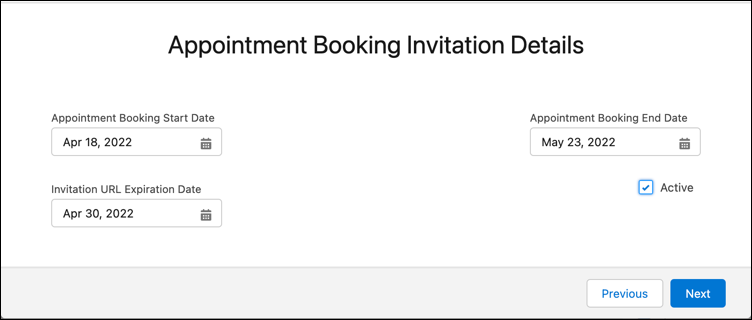
          With this component, users can specify the details of an appointment invitation.

          Required Editions

          Available in: Lightning Experience.
          Available in: Enterprise and Unlimited Editions

          Screen that let users specify invitation details

          Attribute Description Additional Information
          API Name Use underscores and alphanumeric characters without spaces. Begin the name with a letter, don’t end the name with an underscore, and don’t use two consecutive underscores.
          • Type: Input
          • Data type: String
          • Used in: Generate Appointment Invitation and Book Appointment from Invitation flows
          Active Indicates whether the appointment invitation is active.
          • Type: Input and Output
          • Data type: Boolean
          • Used in: Generate Appointment Invitation and Book Appointment from Invitation flows
          Appointment Booking End Date

          End date of the availability for an appointment booking.

          Format: MM/DD/YYYY

          Example: 04/21/2022

          • Type: Input and Output
          • Data type: Date
          • Used in: Generate Appointment Invitation and Book Appointment from Invitation flows
          Appointment Booking Start Date

          Start date of the availability for an appointment booking.

          Format: MM/DD/YYYY

          Example: 04/04/2022

          • Type: Input and Output
          • Data type: Date
          • Used in: Generate Appointment Invitation and Book Appointment from Invitation flows
          Invitation URL Expiration Date

          Date on which the invitation URL expires.

          Format: MM/DD/YYYY

          Example: 04/15/2022

          • Type: Input and Output
          • Data type: Date
          • Used in: Generate Appointment Invitation and Book Appointment from Invitation flows
           
          Loading
          Salesforce Help | Article