
You are here:
Flow Screen Component: Select Service Resource and Service Appointment Time
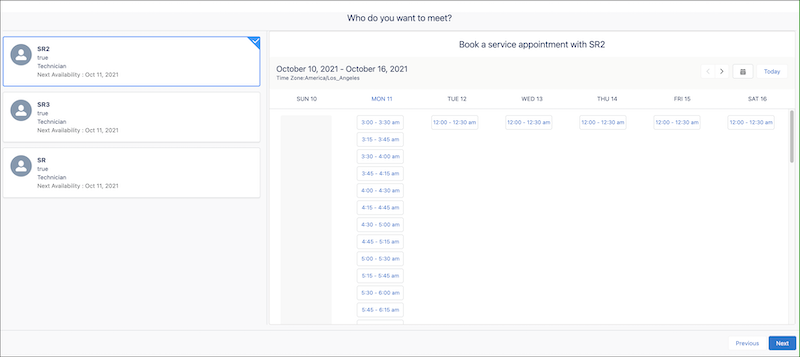
Enables users to select a service resource (appointment attendee) and an appointment time.
Required Editions
| Available in: Lightning Experience. |
| Available in: Enterprise and Unlimited Editions |

| Attribute | Description | Additional Information |
|---|---|---|
| API Name | Use underscores and alphanumeric characters without spaces. Begin the name with a letter, don’t end the name with an underscore, and don’t use two consecutive underscores. |
|
| Anonymous Booking | Indicates whether anonymous booking is enabled. If the value is set to true, the Anonymous Booking option appears. If users select this option, a service resource is assigned automatically when users select a time slot. If a value isn't set, false—the default value—is used. Example: {!$GlobalConstant.True} |
|
| Anonymous Booking Selected | Indicates whether a user wants a service resource to be assigned automatically.  Important Always specify a value for this field. Example: {!$GlobalConstant.True} |
|
| Correlation Id | The unique ID of the appointment scheduling data. Correlation ID is one of the parameters of the ServiceAppointmentRequestInfo class that’s passed to the ServiceResourceScheduleHandler Apex interface. For example, use Correlation Id to identify the system that is calling the ServiceResourceScheduleHandler interface implementation. If a value isn’t set, a random identifier is passed. |
|
| Default Time Zone | The time zone according to which the service resource's available slots appear. If a value isn't set, time slots appear according to the time zone of the user running the flow. See Supported Time Zones. Example: America/Los_Angeles |
|
| Filter By Resource IDs | A comma-separated list of resource IDs. If a value is set, the component shows only available resources from this list. If a value is set for this attribute and Anonymous Booking is set to {!$GlobalConstant.True}, when a user selects the Anonymous Booking option, the screen shows time slots for only these resources. Example: 0Hnxx0000004DdpCAE, 0Hnxx0000004DscCAE |
|
| Inbound Scheduling | Indicates whether a screen is used in inbound scheduling flow. Important Always set the value to true. This attribute doesn’t change any elements on the screen but takes care of the other conditions on the screen. If a value isn't set, false—the default value—is used. Example: {!$GlobalConstant.True} |
|
| Number of Resources to Show (Appointment Distribution) | The maximum number of resources that are available for users to choose from when appointment distribution is enabled. If a value isn't set, the component shows a maximum of 10 resources. To get good performance, set the value to 10 or less. |
|
| Parent Record ID | The ID of the parent record for which the appointment is being scheduled. Supported values are account ID, case ID, opportunity ID, and lead ID. Example: 001xx000003GZQFAA4 |
|
| Scheduling Policy | The developer name of the scheduling policy that is used by the schedule optimizer. Note This field doesn’t support Salesforce ID. Example: default_appointment_scheduling_policy |
|
| Selected End Time | The end time of the time slot. If a value is set, a time slot that ends at this time is selected by default. When a user selects a time slot on the screen, the value is updated based on the selected time slot. Format: MM/DD/YYYY, hh:mm AM/PM Example: 6/8/2021, 7:30 PM |
|
| Selected Start Time | The start time of the time slot. If a value is set, a time slot that starts at this time is selected by default. When a user selects a time slot on the screen, the value is updated based on the selected time slot. Important When a user selects a service
resource, Salesforce Scheduler clears the selected time slot information.
Salesforce recommends that when you use this attribute, you also set a value for
the Service Resource attribute to select a default service resource. Format: MM/DD/YYYY, hh:mm AM/PM Example: 6/8/2021, 7:00 PM |
|
| Selected Time Zone | The time zone selected by a user. Example: America/Los_Angeles |
|
| Service Resource | The ID of the selected service resource for which time slots are shown. When a user selects a service resource, this value is auto-populated. Example: 0Hnxx0000004D56CAE |
|
| Service Resource Booking | Indicates whether service resource booking is enabled. If the value is set to true, the screen shows available resources. If the value is set to false, the screen doesn’t show available resources. You can set this value to false only when you enable anonymous booking. If anonymous booking is enabled and if this value is set to true, users can either select a service resource or select the Automatically assign a service resource option. If a value isn't set, true—the default value—is used. Example: {!$GlobalConstant.True} |
|
| Service Territory | The ID of the service territory for which available service resources and time slots appear. Example: 0Hhxx0000004DUuCAM |
|
| Show service resources by Availability | Indicates whether service resources are sorted by availability, with earliest available resources shown first. Set this value to false only if you’re using Appointment Distribution so that service resources are sorted based on the assignment policy. If a value isn't set, true—the default value—is used. Example: {!$GlobalConstant.True} |
|
| Show Time Zone Pick List | Indicates whether the time zone picklist appears. If a value isn't set, false—the default value—is used. Example: {!$GlobalConstant.False} |
|
| Start Date | The date for which time slots appear. If the value is empty or set to a date in the past, time slots for the current date appear. If the value is set to a future date, time slots for the specified date appear. If the screen can show time slots for 7 days, then time slots appear for the start of the week to the end of the week for the specified date. For example, if the date passed is 2021-06-08T19:30:00Z, which is a Tuesday, time slots appear for 6 June 2021 (Sunday) to 12 June 2021 (Saturday). If the screen can show time slots for only one day, time slots appear only for the specified date. Format: YYYY-MM-DDThh:mm:ssZ Example: 2021-06-08T19:30:00Z |
|
| Time Slot Preload Multiplier | A multiplier that is used to determine the number of days for which time slots are fetched by each server call. Supported values are 1 and 2. For example, if the screen can show time slots for 7 days and if this value is 2, time slots for 14 days (7x2) are fetched by each server call.  Tip If your users generally look at time slots beyond the default dates
that appear, set the value to 2 to reduce the number of server calls. |
|
| Validations | The error messages in the Select Service Resource and Service Appointment Time component. This value is auto-populated. For example, the attribute stores the error message that’s generated when a user tries to navigate to the next screen without selecting a time slot. |
|
| Work Type Group | The ID of the work type group for which the screen shows service resources and time slots. Example: 0VSxx0000004D0GGAU |
|
