
You are here:
Salesforce Scheduler Implementation Guidelines
Learn about the limits and limitations that exist for Salesforce Scheduler and plan your implementation accordingly.
Required Editions
| Available in: Lightning Experience. |
| Available in: Enterprise and Unlimited Editions |
Limited Support on Mobile Devices
- Salesforce Scheduler standard flow templates don’t support multi-resource scheduling on a mobile device.
- You can’t use Salesforce Scheduler in the Salesforce mobile app. Instead, we recommend using the mobile browser when you’re working with Scheduler on a mobile device. For more information, see Supported Browsers and Devices for Lightning Experience.
- Outbound flows aren’t supported on a mobile device.
Flow-Specific Limitations
- Salesforce Scheduler standard flow templates support Chinese, Danish, Dutch, English, Finnish, French, German, Italian, Japanese, Korean, Norwegian, Portuguese, Russian, Spanish, Swedish, and Thai.
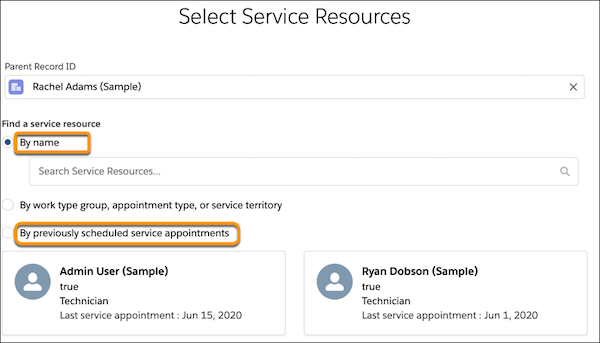
- The By name and the By previously scheduled service appointments options don’t show asset
service resources (or assets). Proceed by selecting the By work type group, appointment type,
or service territory option, and then select an asset on the page that shows the list of
available service resources.
- On the flow screen where you select a service territory, the operating hours are shown in the time zone of the service territory’s operating hours and not in the user’s time zone.
- When you launch a flow by using an action button, it doesn't show the dynamic flow progress indicator as you proceed through the flow stages. The indicator is visible when a flow is launched via a quick action button.
Limitations with Event Management, Concurrent Scheduling, and Multi-Resource Scheduling
- Concurrent scheduling and multi-resource scheduling don’t work together.
- Multi-resource scheduling supports a maximum of five required service resources, including asset service resources (or assets).
- With multi-resource scheduling enabled, Salesforce Scheduler flows don’t work when added to the sidebar of a record page.
- When anonymous scheduling is enabled, Salesforce Scheduler automatically selects a service resource for an appointment. As a result, even if multi-resource scheduling is enabled, Salesforce Scheduler can’t assign multiple resources to an anonymous appointment.
- To use the Event Management setting for inbound appointment flows, always use a community license that provides access to the Event object.
-
When Event Management is enabled, you can’t edit Salesforce calendar events that are created via Salesforce Scheduler service appointments.
Service Appointment must always be the parent object. Don’t directly edit a Salesforce calendar event. Instead, update the corresponding Service Appointment record, which, in turn, updates the event record.
- When Event Management is enabled, the subject field for the Event object is limited to 255 characters. However, if both Event Management and Block Resource Availability are enabled, Scheduler appends Block time before: or Block time after: in the subject field. Therefore, the limit for the subject field becomes 234 characters. Any character beyond the specified limits is truncated.
- Salesforce Scheduler doesn’t support multi-day scheduling. In other words, you can’t schedule appointments that span more than one day.
Limitations for Scheduling Appointments for Cases
- Only partners and customer care reps can book an appointment for cases.
- Salesforce Scheduler doesn’t support booking an appointment for asset-related cases.
- When you book an appointment for a case related to an account, Salesforce Scheduler doesn’t consider the account preferences and operating hours defined for the account.
- When you book an appointment for a case that's related to an account or a contact, the booked appointment doesn’t show the details of the corresponding account or contact.
- You can't add Service Appointments to the Related tab of a case record page.
Did this article solve your issue?
Let us know so we can improve!
