
Loading
Salesforce now sends email only from verified domains. Read More
Manage Appointments with Salesforce Scheduler
Table of Contents
Select Filters

          No results
          No results
          Here are some search tips

          Check the spelling of your keywords.
          Use more general search terms.
          Select fewer filters to broaden your search.

          Search all of Salesforce Help
          Check External Calendars to Determine Resource Availability

          Check External Calendars to Determine Resource Availability

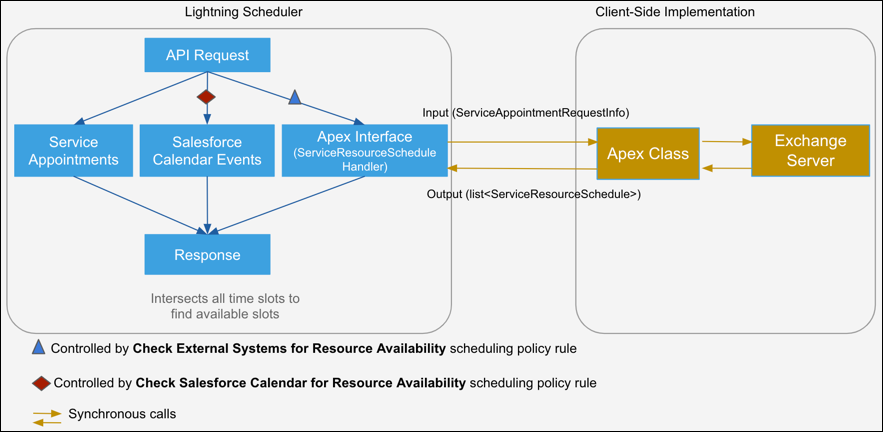
          When you run a Salesforce Scheduler flow or make an API call, the Apex interface makes a synchronous call to the Apex class. The Apex interface passes the details of the requested service resources and timelines for which Salesforce Scheduler wants to find the resources’ availability on the external calendar. The Apex class checks the external calendar events and returns the time slots where resources aren’t available. Salesforce Scheduler excludes the unavailable time slots during appointment scheduling.
          Required Editions

          Available in: Lightning Experience.
          Available in: Enterprise and Unlimited Editions

          External calendar update overview

          1. From Setup, in the Quick Find box, enter Scheduling Policies, then select Scheduling Policies.
          2. Click Edit next to Default Appointment Scheduling Policy or your custom scheduling policy.
          3. Click in the Check External Systems for Resource Availability field, and select your Apex class.
          4. Save your changes.
           
          Loading
          Salesforce Help | Article