
You are here:
Set Up Operating Hours in Salesforce Scheduler
Operating hours represent the time slots during which appointments can be scheduled. For example, if a bank allows mortgage appointments at a branch only Monday through Wednesday, from 8 AM to 2 PM, create operating hours for the mortgage work type that reflect this requirement.
Required Editions
| Available in: Lightning Experience. |
| Available in: Enterprise and Unlimited Editions |
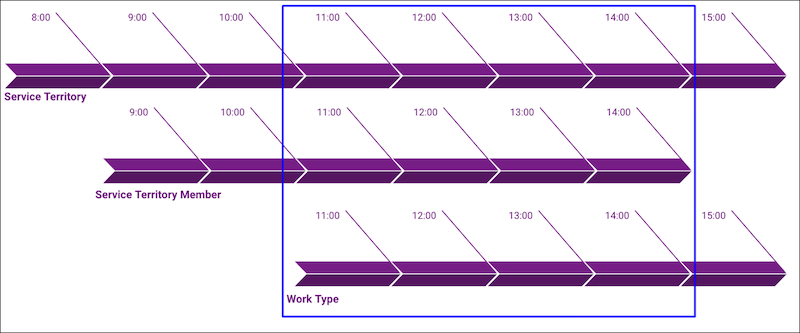
Operating hours serve as the basis to identify the availability of a resource for a work type at a service territory. Define clear time slots for service territories, work types, and service territory members to obtain the right availability for an appointment.

| Element | Operating Hours | Example |
|---|---|---|
| Service Territory | Required | The 1 Market St. branch operates during 6 AM to 6 PM, Monday through Friday. |
| Service Territory Member | Optional If you don’t assign operating hours to a service territory member, it automatically uses its service territory’s operating hours. |
Sara is a banker (service resource) and her operating hours at the 1 Market St. branch are 8 AM to 5 PM, Monday through Friday. |
| Work Type | Optional If you don't assign operating hours to a work type, it’s considered to be always available. |
Mortgage appointments at the 1 Market St. branch are allowed only Monday through Wednesday, from 8 AM to 2 PM. |
| Account | Optional Applicable only if the Enforce Account’s Visiting Hours option is selected in the scheduling policy. |
John, a customer, strictly takes morning appointments. Bankers’ scheduling time with John can’t have any evening slots. |
During appointment scheduling, availability of appointment time slots is determined based on an intersection of the time slots in operating hours of the service territory, service territory member, and work type. The availability of concurrent times slots (which is applicable only for service territory members) is also determined in the same fashion.

Sara is a banker who mostly works in the 1 Market St. branch, but is occasionally assigned to appointments in a nearby branch at 101 Mission St. Her primary service territory is the 1 Market St. branch, and her secondary service territory is the 101 Mission St. branch.
Sara’s operating hours in the 1 Market St. branch are 8 AM to 5 PM, Monday through Friday. However, because Sara can only support the 101 Mission St. branch at specific times during Monday through Thursday, her operating hours in that territory are 10 AM to 3 PM, Monday through Thursday. Both branches operate during the same hours: 6 AM to 6 PM, Monday through Friday. To reflect these hours in Salesforce, her Salesforce admin does the following:
- Create three sets of operating hours from the Operating Hours tab, adding time slots for
each day:
- 6 AM to 6 PM Monday - Friday
- 8 AM to 5 PM Monday - Friday
- 10 AM to 3 PM Monday - Thursday
- Add the first set of operating hours to the 1 Market St. and 101 Mission St. service territories via the Operating Hours field.
- Add the second set of operating hours to Sara’s service territory member record for the 1 Market St. service territory via the Operating Hours field.
- Add the third set of operating hours to Sara’s service territory member record for the 101 Mission St. service territory via the Operating Hours field.
- Add the Operating Hours Component to Record Pages
Add the Operating Hours component to the service territory, service territory member, and work type record pages. - Update the Default Operating Hours Sharing Setting
The sharing setting for operating hours is set to Private, by default. To access the operating hours, change the default sharing setting. - Create Operating Hours in Salesforce Scheduler
View, create, and modify operating hours and time slots on the Operating Hours tab in the Salesforce Scheduler Setup app. Or use the Operating Hours component on a work type, service territory, or service territory member record page. - Assign Operating Hours to Service Territories, Service Territory Members, and Work Types
Assign operating hours to a work type, service territory, or service territory member using the Operating Hours field on the respective record page.
