
Loading
Salesforce now sends email only from verified domains. Read More
Manage Users and Data Access
Table of Contents
Select Filters

          No results
          No results
          Here are some search tips

          Check the spelling of your keywords.
          Use more general search terms.
          Select fewer filters to broaden your search.

          Search all of Salesforce Help
          Delegate Account Management to an External User

          Delegate Account Management to an External User

          Give external users the power to manage account members and account brand information. Administrators, internal users, and partner users with the Delegated External User Administrator permission can create and edit a member, reset a member’s password, and activate or deactivate a member. They can also upload brand logos and save company information for co-branded email templates to partner users, and create marketing campaigns, deal notifications, and websites.
          Required Editions

          Available in: Enterprise, Performance, Unlimited, and Developer Editions
          Admin Permissions Needed
          To manage external users: Manage External Users
          To create, edit, and delete profiles: Manage Profiles and Permission Sets
          To administer other members of the same site, as an external user: Delegated External User Administrator

          To allow external users with Delegated External User Administrator permission to access member and brand information, add the Account Brand and Members related lists to the Accounts detail page.

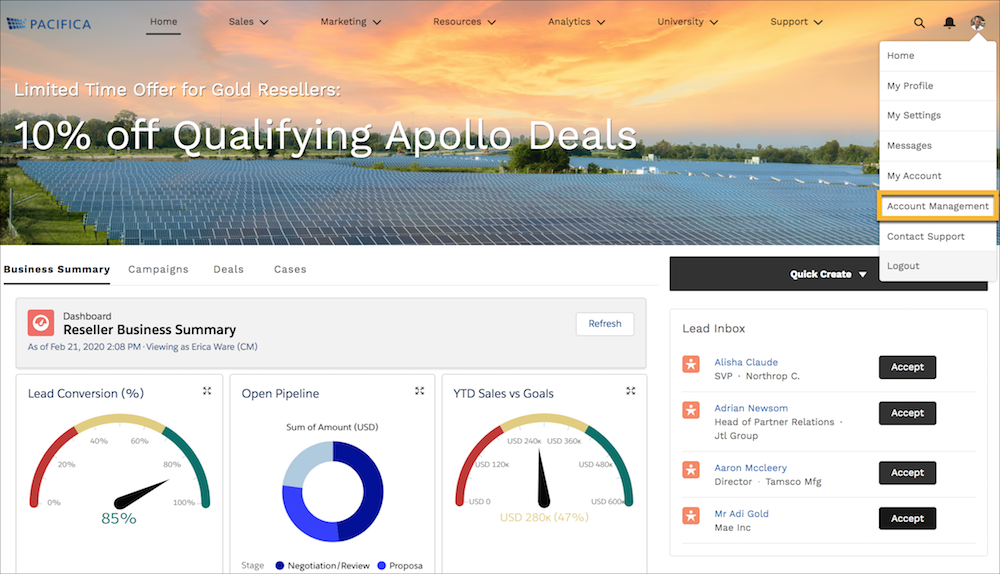
          Select the icon of the account that you’re managing, and select Account Management.
          Account Management dropdown from profile menu
          • Allow External Users to Manage Partner Members
            In addition to administrators and internal users, partner users with the Delegated External User Administrator permission can activate, deactivate, create, and edit members. They can also reset member passwords.
          • Allow External Users to Manage Partner Brands
            In addition to administrators and internal users, partner users with the Delegated External User Administrator permission can update and access partner brand information. They can also create co-branded emails, marketing campaigns, websites, and apps for channel sales from information uploaded to the Branding tab.
           
          Loading
          Salesforce Help | Article