
You are here:
Create an Account Relationship
When you’ve created an account relationship data sharing rule, assign it to an account relationship to begin sharing.
Required Editions
| Available in: Salesforce Classic and Lightning Experience |
| Available in: Enterprise, Performance, Unlimited, and Developer Editions |
| Applies to: LWR, Aura, and Visualforce sites |
| User Permissions Needed | |
|---|---|
| To create and manage Account Relationships: | Create and Set Up Experiences AND You must be a member of the Experience Cloud site |
The following fields define the account relationship:
| Field Name | Description |
|---|---|
| Name | The name of the account relationship. We suggest including both account names and the type of relationship they have. |
| Account From | The account that is gaining access to another account’s data. |
| Account To | The account that is giving access to their records to another account. |
| Account Relationship Type | This field defines the type of sharing rule this account relationship can access. It’s the field that associates the account relationship to the account relationship sharing rule. If the Account Relationship Type picklist value that you need is not available, go to the Account Relationship Type field definition page on the Account Relationship object Settings page and create a picklist value. |
-
To view the accounts that are sharing data, add the Account To and Account From related
lists to the Account page layout.
- From Setup, enter Account in the Object Manager Quick Find box.
- Go to Accounts | Page Layouts | Account Page Layout.
- Click Edit and go to the Related List tab.
- Drag Account To and Account From related lists to the Account page layout.
- Save your changes.
- Go to a partner account, scroll to the Account Relationship related list, and click New to create an account relationship.
- Enter the account who is sharing their data in the Account To field. Enter the account that is gaining access to the data in the Account From field. The Account Relationship Type value must match the Account Relationship Type value in the account relationship data sharing rule.

Example If Northern Trail Outfitters wants to share their leads with Cloud Kicks, they create
this account relationship.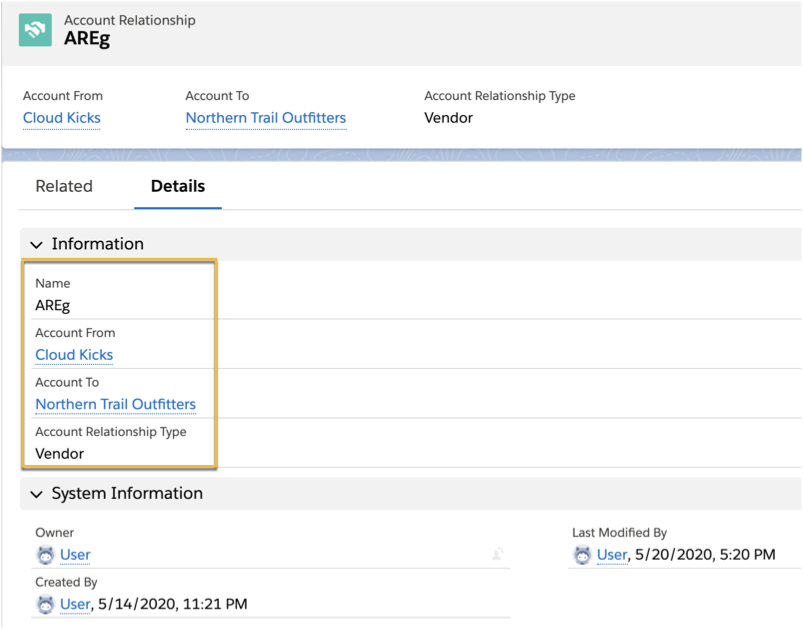
Learn more about account relationships in this video.
Did this article solve your issue?
Let us know so we can improve!
