
You are here:
Next Generation DevOps Center
Bring modern DevOps best practices to your team with the AI-powered, next-generation DevOps Center. Built on the principles of the existing DevOps Center, it provides a click-based user interface (UI) and serves as a central development hub where your team can collaborate.
Required Editions
| Available in: Lightning Experience in Professional (API access required), Enterprise, Performance, Unlimited, and Developer Editions |
| Available in: Government Cloud Plus as interoperable. Turning on DevOps Center in Government Cloud Plus orgs can send data outside the authorization boundary. Contact your Salesforce account executive for more details. |
| Not available in: EU Operating Zone. EU Operating zone is a special paid offering that provides an enhanced level of data residency commitment. DevOps Center is supported in orgs in the EU that aren’t part of EU OZ, per standard product terms and conditions. |
DevOps Center uses source control as the single source of truth for your team. It uses Salesforce DX Model Context Protocol (MCP) Server and DevOps Center MCP tools to provide AI-based recommendations for work item management, conflict resolution, and deployment failure resolution.

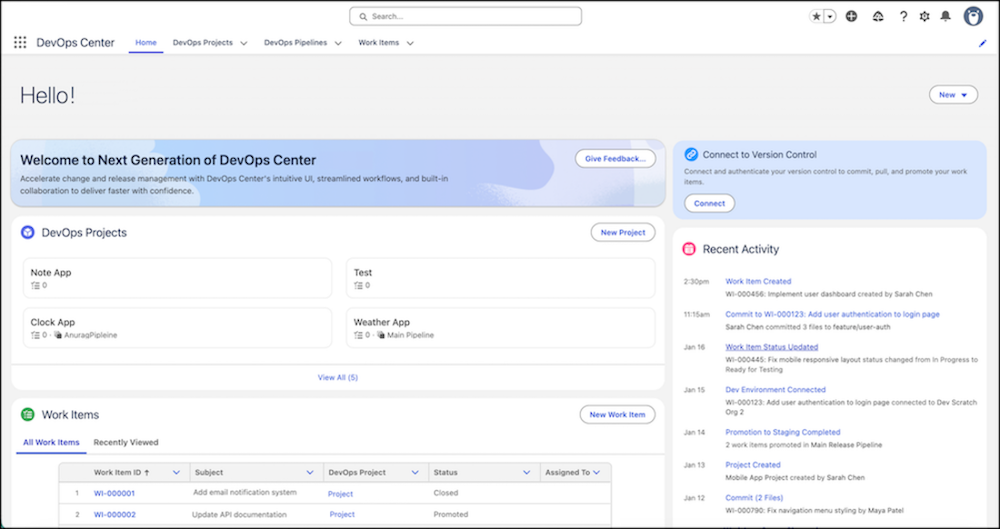
Enhancements Over the Current DevOps Center
While the current DevOps Center provides essential capabilities for pipeline, change, and release management, the next-generation DevOps Center introduces these capabilities:
- AI-powered assistance and resolution: Use natural language prompts to resolve complex DevOps issues, such as merge conflicts. This experience is powered by DevOps Center MCP tools in Salesforce DX MCP Server.
- Instant setup: DevOps Center doesn't require any package downloads and installs. After you turn on DevOps Center in your DevOps Center Hub org, you can instantly start using it.
- Modern and extensible UI: A new, intuitive, and extensible UI built on Salesforce Lightning Design System 2 (SLDS 2) helps teams customize DevOps Center. With advanced themes and flexible layouts, teams can integrate tools that align with their specific governance models.
- Flexible environment support: Teams can build, track, and commit changes from non-source-tracked development environments. This enhancement is ideal for workflows with complex data configuration where source tracking isn't enabled.
- Integrated change tracking: DevOps Center integrates with DX Inspector to streamline tracking, committing, and reviewing metadata and data changes directly from your development orgs. This integration provides greater visibility and control over what's being promoted through your pipeline.
Provide Feedback
To provide general feedback, request support, or product enhancements, use the DevOps Center GitHub repository.
- Plan Your DevOps Center Setup
Before you configure the next-generation DevOps Center, plan how your team works and what your release process looks like. The decisions you make during setup, such as how many pipeline stages to create, which environments to connect, and which source control provider to use, shape how effectively DevOps Center works for your organization. - Set Up Next Generation DevOps Center
Configure next-generation DevOps Center to manage your release management lifecycle. Review the prerequisites, turn on the feature, manage users, and set up your projects and pipelines. - Get Started as a Team Member in Next Generation DevOps Center
After your team manager or DevOps Center Admin sets up the next-generation DevOps Center, they notify you when the DevOps Center org is ready. As part of the setup process, they create one or more projects, pipelines, and work items. They also add each team member’s source-tracked development environment. - DX Inspector
Connect your development environment directly to your next-generation DevOps Center project to manage work items and track changes without leaving your org. - Review Changes with Team Members
After you open a pull request in your source control repository, your team members and collaborators can add comments about the changes. - Promote Work Items
Move your work items through a predefined sequence of pipeline stages, guiding them from development to production. - External Merges
DevOps Center detects external changes that you merge directly into a stage’s source control branch. - Custom Promotion
Select and promote individual work items that are ready for the next pipeline stage by using custom promotion. - Keep Your Development Environment in Sync
Use back sync to update your development environment with the latest changes from the pipeline, which helps maintain compatibility and minimize merge conflicts. - Version Control System Synchronization
Maintain consistency between your pipeline and your source control repository by detecting external changes and merges. - DevOps Center Events in Activity History
View a comprehensive timeline of key DevOps events, including commits, promotions, and synchronizations, to audit activity and troubleshoot errors. - Measure Project Performance with DORA Metrics
Track your team’s delivery speed and stability by using DevOps Research and Assessment (DORA) metrics in the next-generation DevOps Center. These metrics help you understand how quickly work items move to production and how reliably promotions succeed. You can view metric data for up to 90 days.
