
You are here:
Session-Based Permission Sets
A session-based permission set applies to a specific user session to grant someone functional access to permissions.
Required Editions
| Available in: both Salesforce Classic and Lightning Experience |
| Available in: Essentials, Contact Manager, Professional, Group, Enterprise, Performance, Unlimited, Developer, and Database.com Editions |
Let’s say your org has a custom object named Conference Room. A mobile app called Conference Room Sync has read and update access to the object. You can create a permission set to allow updates to the object only when the Conference Room Sync connected mobile app generates the user’s session.
Or perhaps you have a web application that accesses confidential information. For security reasons, you want to limit user access to a predetermined length of time. You can create a session-based permission set that activates only when users authenticate into your environment using a token. When the token expires, the user must reauthenticate to access the application again.
You can also use session-based permission sets in Flow Builder. For example, you have a junior buyer in your org who occasionally requires access to your Contracts object. Create a session-based permission set with access to the object, and then create a flow that uses the Activate Session-Based Permission Set action available in Flow Builder. In the flow, pass the permission name to the action. During runtime, the action checks who’s running the flow. When the flow runs, the activation process fires. After the flow completes, the buyer has access to the Contracts object for the current session.
Session-based permission sets don’t support asynchronous processes, such as deploying custom metadata. Session-based permission sets are valid only for the session on which they're enabled.
To activate session-based permission sets via REST API or SOAP API, see the SessionPermSetActivation object in the Object Reference. You need the Manage Session Permission Set Activation permission.
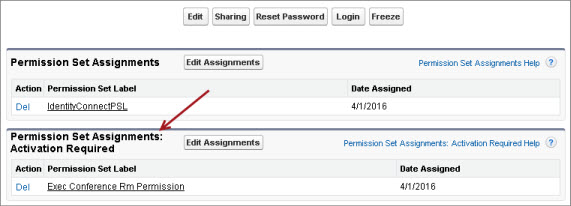
Before assigning session-based permission sets to users, ensure that they can meet the conditions of the permission set. For example, grant user access to appropriate tools, such as authenticators. As a best practice, inform users of the conditions in which they can access certain applications and tools. User assignment information appears on the user detail page in a related list called Permission Set Assignments: Activation Required.

- Create a Flow That Can Activate or Deactivate a Session-Based Permission Set
You can create a session-based permission set and then create a flow that users can run to activate or deactivate the permission set themselves.
