
You are here:
Using and Validating Asset Tokens
After Salesforce issues an asset token, the device presents its data or event to your backend service along with the asset token. Your backend service validates the asset token and determines whether the device is authorized for the requested operation. Common methods for securing communications between the device and your backend service are the bearer token sequence and the JWT bearer token exchange sequence. Use standard open-source libraries to validate asset token JWTs.
Required Editions
| Available in: both Salesforce Classic (not available in all orgs) and Lightning Experience |
| Available in: All Editions |
Using Asset Tokens in the Bearer Token Sequence
The bearer token sequence is a simple, common method for the client to present the
asset token in the Authorization header, like an OAuth token: Authorization: Bearer JWT. One
token is generated for each call. The bearer token sequence is the simpler
approach.
The following diagram shows the bearer token exchange for an Experience Cloud site.
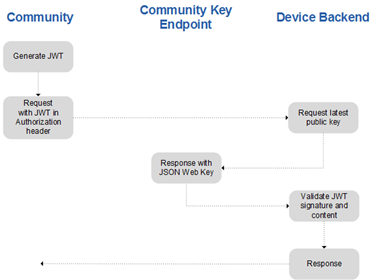
Here’s an example of bearer token exchange for an Experience Cloud site.
POST /ingestapi HTTP/1.1
Host: api.devicebackend.com
Content-Type: application/json
Authorization: Bearer
eyJraWQiOiJBc3NldHMiLCJ0eXAiOiJKV1QiLCJhbGciOiJSUzI1NiJ9.eyJhdWQiOlsiaHR0cDovL2xvY2F saG9zdDo1MDAwIl0sIm5iZiI6MTQ1MjQ5MTc4OSwiaXNzIjoiaHR0cHM6Ly9hc3NldGlkLWRldmVsb3Blci1 lZGl0aW9uLm5hMS1ibGl0ejAzLnNvbWEuZm9yY2UuY29tIiwiY25mIjp7Imp3ayI6eyJrdHkiOiJSU0EiLCJ lIjoiQVFBQiIsImtpZCI6ImRldmljZWtleSIsIm4iOiJqY3YxZndyQnFZa2NzeFBTSjR2cG03Yjc4cXZpTjl 3OXVieF9sUUhV0lEWDdOYUt2UGxQNmxGUDF3MHJZci0xelN1c0JGakxLeGhrVmJsSGRER3ZldDN4NUJmZ1p3 NXducmt3N1ZqYjZyeWNMNWhGOVBuOXU2Rndla3NXN0l4YnBqRVZQbEltT1I4Mkg0LXdOV053dzFCZ2xrVlJF OTdsUFVMQlc0WlRwbkZiTW84a2owVVE0S2d2Ri13UnN1dmcwOVhaa1FPdnF4dFdHQ0pJUzJZSHoxUEw1cEll TXFwMFlwSkxWZ3g1QXZHTDVHNXl0bVprX3JfZnl1QXJ4TGstdWZXNE1qSkw2Rmo4dzFLYnZ6YXhlMWlDbGQ tdXRsd2JUWmtfN0daSUtsbVR4d1JGZkJqVWM4VzRsbFJoMDdFUXI0cThpNHVYeEJaQ3pEWjcyQWxXWHcifX0 sImlkIjoiMDViRDAwMDAwMDAwMDU2IiwiZXhwIjoxNDUzMDEwMTc1LCJhaWQiOiIwMmlEMDAwMDAwMTZHTVI iLCJkaWQiOiI2YWM5YmMyMi0yYTQxLWI4NWEtYWY3Ni1jMTJlOWUzYmY4YmMifQ.LhGF8nkJVd3soE 7UjLujjTVIjMzbzwicWpJ6tLlFScX7Yc45nzv1ccDB2UHHj2R5aEZT4K8gfLAD8AHWHErhwVmHLkTeqtXok8 a-S1dg QW_7-STybWl3Bf2xHXomm9ZdvL406UaZMOdCNrNDSqAZn0kgupo3orzkCC3YLCes1nc4iFIMKXbWCeRiEkGo Przx09PnJqUA9nz74nyKo3-NhpZvy6o-qxAryeibUeOfrtG8wvbnjjbNEDukS-GU0rZTcW9KABboCT 13DLFM 5caFofNgcKE3W67zlJIcSAEgOSVNVoiFYwSlTvWiyxMIMabEOd8usAfwnIKk1XUYnuNG0w

{"some": "data"}
Using Asset Tokens in the JWT Bearer Token Sequence
In the JWT bearer token exchange sequence, the client generates the request, calls the target system to exchange its asset token, and receives an OAuth token that it presents for subsequent calls. This usage can be more efficient if you’re orchestrating a series of calls or if the target is session-oriented. One token is generated and exchanged per session on the target, using the JWT Bearer Token profile for OAuth 2.0 client authentication defined by the RFC 7523 specification.
The following diagram shows the JWT bearer token exchange for an Experience Cloud site.
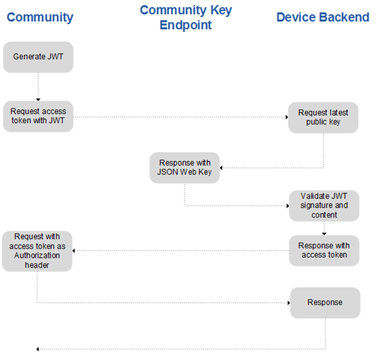
In this example, you first request an access token:
POST /oauth2/token HTTP/1.1
Host: login.devicebackend.com
Content-Type: application/x-w w-form-urlencoded
grant_type=urn%3Aietf%3Aparams%3Aoauth%3Agrant-type%3Atoken-exchange&subject_
grant_type=urn%3Aietf%3Aparams%3Aoauth%3Agrant-type%3Ajwt-bearer&assertion=ey
JraWQiOiIxOTgiLCJ0eXAiOiJKV1QiLCJhbGciOiJSUzI1NiJ9.eyJhdF9oYXNoIjoiT1c2ajJfNF
pqcmU4cGFkREpYdEZEQSIsInN1YiI6Imh0dHBzOi8vbG9naW4uc2FsZXNmb3JjZS5jb20vaWQvMDB
EMzAwMDAwMDAwbWx4RUFBBLzAwNTMwMDAwMDAwZ0tWOEFBTSIsImF1ZCI6IjNVkc5OU94VHlFTUNR
M2dYdVgzMWx5c1gzUlFQNC5WajNFVnpsTXNWYnhGdlVlN1ZqWjBXY2pXdkdsQVU3QlBKRlpCU3lCR
1BpR3lIaG9qWjJCRTMiLCJpc3MiOiJodHRwwczovL2xvZ2luLnNhbGVzZm9yY2UuY29tIiwiZXhwI
joxNDUxNTExNjU2LCJpYXQiOjE0NTE1MTE1MzZ9.ervvV9H89ODomiXekq0_6SVkgxZkQGaJ8nKXj
t3VSCB46e7YiHN3lDg9BXFfT8NdtipCHpHNQCAJ38R-II_txVb1U-QE598sNK5aHVGNkyzoQnPIsL
VPFDZrWCi1v4FDGBfxtckiGWw_bN1x_FYO0qnLwaD5Fdz7kNdi_Xujvsf63tdW-nfWUoyld6-htu5
eDI3cergGz3itaYyJHpPF7od11ff6O2cW9YUVXQaOF1vcOPK1R23QTlxkPm5rNT2NnWyEWEm_v4Fj
TbqItNK5hgRQO6DYG1xmCkC6V1AD7AVIRbTF99-9f_c5t9BDR1x1AMDo6JKcHAVCafngdQ1jRNlML
0CGT92GgQ6PGD7Ea5oy1zqu7gub1vYpFrI_3s2tVD_2nRIAgQuSVW5ckSxcX4Xh6Qukiu1woKkM5H1
6_Pm5iY4jexXKkQDWlfsCsANtFCopYfOuX1lkm5DqqTwDJL3sixh5eQKr5gtKAd8jzgcV5rfalNcKt
gozW2cGyVO7Co9jjWqchs6ZyOo7Z8mZgxyBkYOI-r73Nv6vplrHgvWe3azGEcgYSl_NN4E0GWu2Qnf
4i9kjvwGwRN_YwMYthArkxYgE8FBt2xrPOq3GV09w4H3mGXHOWjB_H_C7uUPTztbGNDqX4w7R7NMd3
dY5Cu1WYUB_W1AV_BhhAoUUoAoE
Here’s the returned access token:
HTTP/1.1 200 OK
Cache-Control: no-cache, no-store
Content-Type: application/json;charset=UTF-8
{
  "access_token": "AYDWAgEzUqeVsVtcA4ndY25qGFVyaId75im2glOV5Eoog2XajaEjdQlndD7RveqpL7G",
  "token_type": "Bearer"
}
Then use the access token to make service requests:
GET /resource HTTP/1.1
Host:  api.devicebackend.com
Authorization: Bearer AYDWAgEzUqeVsVtcA4ndY25qGFVyaId75im2glOV5Eoog2XajaEjdQlndD7RveqpL7G
HTTP/1.1 200 OK
Cache-Control: no-cache, no-store
Content-Type: application/json;charset=UTF-8

{"some": "data"}
Validate Asset Tokens
Asset tokens are standard JWTs, which means validation follows the standard steps in the RFC 7519 specification, section 7.2. It’s recommended that you use an open-source library for validating JWTs, rather than writing your own signature validation code.
- Split the asset token into three parts separated by the period (.) character.
- Base64url decode the first part as the header, following the restriction that no line breaks, whitespace, or other characters have been used.
- Verify that the resulting octet sequence is a UTF-8-encoded JSON object.
- Extract the kid (Key ID) claim from the header.
- If necessary, fetch this key from the key endpoint. The key becomes your
Experience Cloud site’s URL (or My Domain URL) with
/id/keysappended. Note The key name is unique to the issuer and isn’t globally unique.
 - Verify the JWS according to the RFC
7515 specification.
- Run RSA SHA256 signature validation over the
header.payload.section. - Base64url encode the result.
- Compare it to the presented signature.
- Run RSA SHA256 signature validation over the
Popular open-source libraries for validating JWTs include:
- Java: jose4j—You can use this declaration for your Maven POM file:
<dependency><groupId>org.bitbucket.b_c</groupId><artifactId>jose4j</artifactId><version>0.4.4</ve rsion></dependency> - .NET:
Install-Package System.IdentityModel.Tokens.Jwt - Node:
npm install jsonwebtoken - Python:
pip install pyjwt - PHP:
composer require firebase/php-jwt - Ruby:
gem install jwt
Here’s an example in Java of how to verify an asset token using jose4j:
package your.company

import org.jose4j.jwk.Ht psJwks;
import org.jose4j.jwt.JwtClaims;
import org.jose4j.jwt.consumer.InvalidJwtException;
import org.jose4j.jwt.consumer.JwtConsumer;
import org.jose4j.jwt.consumer.JwtConsumerBuilder;
import org.jose4j.keys.resolvers.HttpsJwksVerificationKeyResolver;
import org.json.JSONObject;

import javax.servlet.ServletException;
import javax.servlet.ht p.HttpServlet;
import javax.servlet.ht p.HttpServletRequest;
import javax.servlet.ht p.HttpServletResponse;
import java.io.IOException;
import java.io.PrintWriter;

public class IngestAPIExample extends HttpServlet {

  private static final String ISSUER = "https://customersite.my.site.com";
  private static final String KEY_ENDPOINT = ISSUER + "/id/keys";
  private static final String AUDIENCE = "https://your.devicebackend.com";

  @Override
  protected void doPost(HttpServletRequest request, HttpServletResponse response)
  throws ServletException, IOException {
    boolean isValidAssetToken = false;
    // Get the asset token from the HTTP Authorization header, removing the "Bearer "
    String authHeader = request.getHeader("Authorization");
    String assetToken = authHeader.substring(7);

    // The HttpsJwksVerificationKeyResolver uses JWKs obtained from the HttpsJwks and
    // selects the most appropriate one to use for verification based on the Key ID and other factors
    // provided in the header of the JWS/JWT.
    HttpsJwks httpsJkws = new HttpsJwks(KEY_ENDPOINT);
    HttpsJwksVerificationKeyResolver httpsJwksKeyResolver = new
    HttpsJwksVerificationKeyResolver(httpsJkws);

    // The JwtConsumer establishes the rules for Validation of our asset token.
    JwtConsumer jwtConsumer = new JwtConsumerBuilder()
      .setVerificationKeyResolver(httpsJwksKeyResolver)
      .setRequireExpirationTime() // The JWT must have an expiration time.
      .setAllowedClockSkewInSeconds(30) // Allow some leeway in validating time-based claims to account for clock skew.
      .setExpectedIssuer(ISSUER) // Entity that the asset token must be issued by.
      .setExpectedAudience(AUDIENCE) // Entity that the asset token is intended for.
      .build(); // Create the JwtConsumer instance.
    try {
      // Validate the JWT and process it to the Claims.
      JwtClaims jwtClaims = jwtConsumer.processToClaims(assetToken);
      isValidAssetToken = true;
    } catch (InvalidJwtException e) {
        // InvalidJwtException thrown if the asset token failed processing or validation.
        System.out.println("Invalid Asset Token: " + e);
    }

    // If your asset token is valid, do something here with your data. For purposes of our example, we’re done.
    PrintWriter out = response.getWriter();
    JSONObject r = new JSONObject();
    r.put("valid", isValidAssetToken);
    out.close();
  }
}
