You are here:
Object-Specific Share Locks
When you create, edit, or delete a sharing rule, recalculation runs to update record access in your Salesforce org. This operation can take some time if you have many users and records. The object-specific share locks feature enables you to make changes to a sharing rule for other objects simultaneously, depending on the objects affected by the sharing rules, sharing rule type, and target groups or roles of the affected users.
Required Editions
| Available in: both Salesforce Classic and Lightning Experience |
Available in: Professional, Enterprise, Performance, Unlimited, and Developer Editions See Sharing Rule Considerations for more information on availability. |
Without object-specific share locks, you can’t submit simultaneous sharing changes until recalculation across all objects is complete. Review the following behavior considerations for object-specific share locks.
- Criteria-based and owner-based sharing rules
- Recalculation is run if a sharing rule has changed or when you click the
Recalculate button on the Sharing Settings page. Clicking this
button locks sharing rules for that object (1), but you can still make changes to
sharing rules for another object.
 Note Use the Recalculate buttons on the Sharing Rules related lists only if sharing rule updates have failed or aren’t working as expected.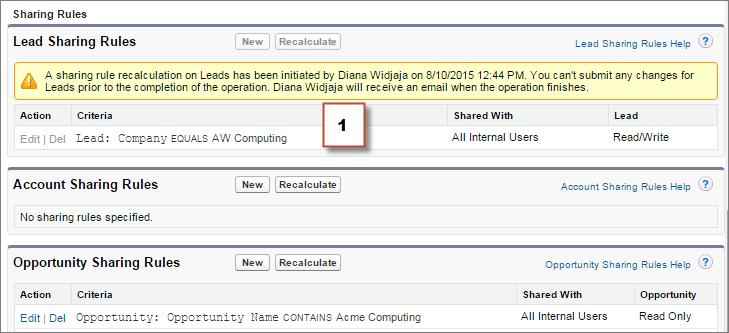
- When recalculation for an owner-based sharing rule is in progress, you can’t create, edit, or delete owner-based sharing rules for that object targeting the same group of users. For example, let’s say you’re creating an owner-based lead sharing rule targeting the All Internal Users group. While recalculation is in progress, you can create another owner-based sharing rule for leads targeting any other public group except the All Internal Users group. You can create, update, or delete owner-based sharing rules for leads targeting all internal users only after the recalculation finishes. You receive an email notification when the recalculation is complete.
- When recalculation for a criteria-based sharing rule is in progress, you can’t edit or delete that rule. But you can create, edit, or delete any other criteria-based or owner-based sharing rule for that object regardless of the target group of users.
-
Note You can’t modify the org-wide defaults when a sharing rule recalculation for any object is in progress. Similarly, you can’t modify sharing rules when recalculation for an org-wide default update is in progress.
- Account, cases, contacts, and opportunities
- Sharing rules can affect accounts and the associated account children—cases,
contacts, and opportunities—so they’re locked together to ensure that
recalculation runs properly. For example, creating or editing an account sharing rule
prevents you from creating or editing a case, contact, or opportunity sharing rule.
Similarly, creating or editing an opportunity sharing rule prevents you from creating or
editing a case, contact, or account sharing rule before recalculation is complete. Locks
aren’t shared across objects, except across accounts and associated account
children.Note Clicking the Recalculate button for any of these four objects’ sharing rules prevents anyone from making changes to sharing rules for those objects until recalculation finishes.
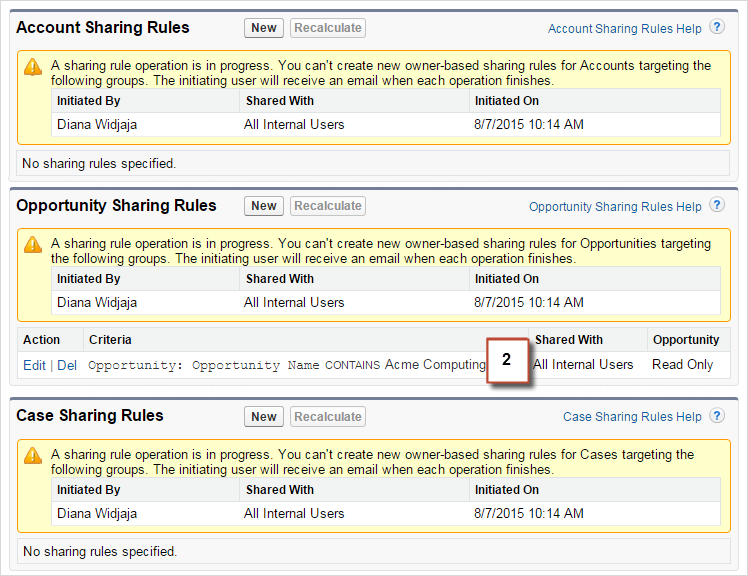
- In the following example, an owner-based account sharing rule has been deleted and
recalculation is in progress. Although you can’t create, edit, or delete another
ownership-based sharing rule for any of these objects, you can make changes to a
criteria-based sharing rule (2) for those objects.