Require Permission to View Record Names in Lookup Fields
To better protect your Salesforce org’s data, you can restrict who can view record names
in lookup fields and system fields, such as Created By and Last Modified By. If you enable the
Require permission to view record names in lookup fields setting, users must have Read access to
these records or the View All Lookup Record Names permission to view this data.
Required Editions
Available in: both Salesforce Classic and
Lightning Experience
Available in: Professional, Enterprise, Performance,
Unlimited, and Developer Editions
User Permissions Needed
To modify sharing settings:
Manage Sharing
Note The View All Lookup Record Names permission only applies to lookup record names in list
views and record detail pages. Lookup record names are visible in history tracking related
lists. To prevent users from viewing record names in history tracking related lists, disable
field history tracking.
From Setup, in the Quick Find box, enter Sharing Settings, and then
select Sharing Settings.
Click Edit in the Organization-Wide Defaults area.
Select Require permission to view record names in lookup
fields.
Enable the View All Lookup Record Names permission in custom profiles or permission sets
for users who must see record names in all lookup and system fields, regardless of sharing
settings.
Example
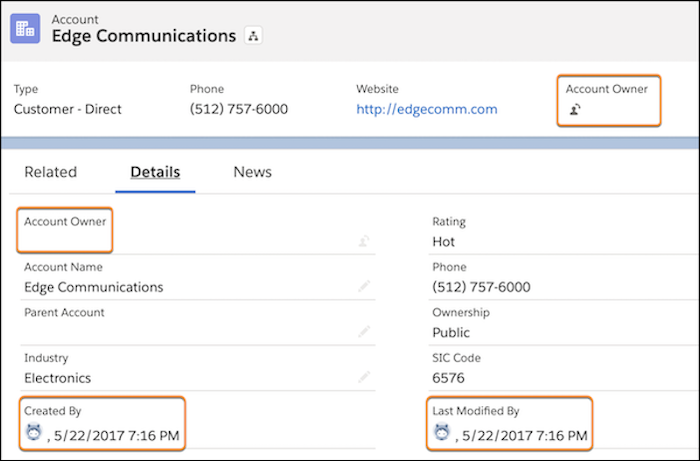
After the Require permission to view record names in lookup fields setting is enabled,
in Lightning Experience, users who don’t have Read access or the View All Lookup Record Names
permission see the lookup field labels, but not the data in the fields.
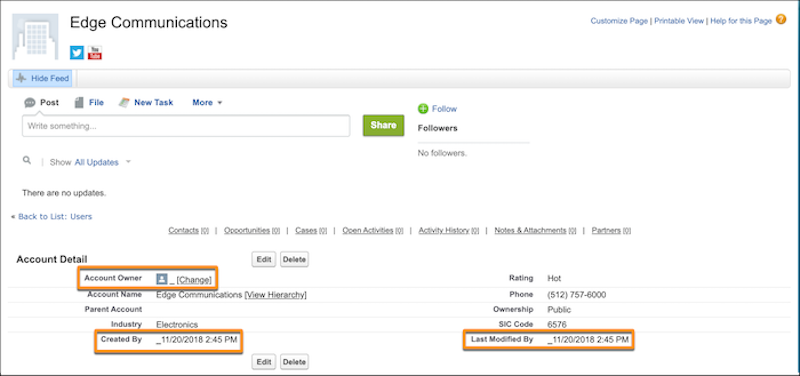
In Salesforce Classic, users who don’t have Read access or the View All Lookup Record
Names permission see an underscore in system user lookup fields. They also see the record ID in
custom user lookup and non-user lookup fields.
Note In Lightning Experience, a parent record's name is visible in lookup fields if the user
has access to its child record via a "View All Records" permission. This behavior applies
even if the user doesn't have access to the parent record. In Salesforce Classic, the parent
record's ID is displayed instead of its name.
We use three kinds of cookies on our websites: required, functional, and advertising. You can choose whether functional and advertising cookies apply. Click on the different cookie categories to find out more about each category and to change the default settings.
Privacy Statement
Required Cookies
Always Active
Required cookies are necessary for basic website functionality. Some examples include: session cookies needed to transmit the website, authentication cookies, and security cookies.
Functional Cookies
Functional cookies enhance functions, performance, and services on the website. Some examples include: cookies used to analyze site traffic, cookies used for market research, and cookies used to display advertising that is not directed to a particular individual.
Advertising Cookies
Advertising cookies track activity across websites in order to understand a viewer’s interests, and direct them specific marketing. Some examples include: cookies used for remarketing, or interest-based advertising.