
You are here:
Implicit Sharing
Implicit sharing is a built-in mechanism in the Salesforce platform that automatically grants users access to parent records if they can access related child records and vice versa. There’s also built-in sharing behavior for external site and portal users.
Required Editions
| Available in: both Salesforce Classic and Lightning Experience |
Sharing for accounts and contacts is available in: Professional, Enterprise, Performance, Unlimited, and Developer Editions Sharing for cases and opportunities is available in Enterprise, Performance, Unlimited, and Developer Editions |
Built-in sharing behaviors apply only to standard relationships. There are different types of implicit sharing in Salesforce: two that affect internal and external users, and a few more that only affect external users. Salesforce defines internal users as users who access a Salesforce org. External users are users who access records via a site created by using Experience Cloud or Industries clouds, such as Healthcare, Manufacturing, and Automotive.
Parent implicit access
- Access to a parent account—If you have access to an
account’s child case, contact, or opportunity record, you
have implicit Read Only access to that account, even with
org-wide defaults on Account set to Private.
For example, you can view the Alex Kim contact in this image because you were granted access through a sharing rule. You can also view the contact’s parent account, Northern Trail Outfitters, but you can’t edit the account data.

- To view the parent account via implicit access, you must have access to the related child case, contact, or opportunity record via ownership or through sharing access. You can’t access the parent account if you only have access to the child records through the View All Records or Modify All Records object permissions.
Child implicit access
- Access to child records—Depending on your sharing
configuration, if you have access to a parent account, you
can have access to the associated child case, contact, and
opportunity records. The account owner’s role and settings
configured in account sharing rules and manual shares
determine the level of access to child records.
For example, in this image, Jane owns the Northern Trail Outfitters account. The Salesforce admin set up Jane’s role so that assigned users can view all opportunities, cases, and contacts associated with accounts they own. Jane can therefore view data for all of the child opportunities, cases, and contacts highlighted for the account she owns, but she can’t edit this data.
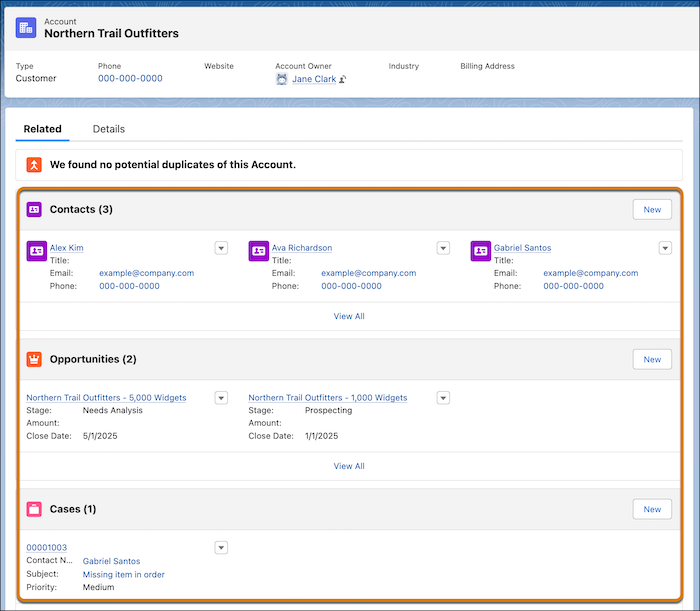
Built-in sharing between accounts and other child objects
- Orders—If you own an order record or are above the order’s owner in the role hierarchy, you have implicit Read Only access to its related parent account. If you have access to an order through a sharing rule or manual sharing, you can only see the related parent account’s name. If you have access to a parent account, you don’t automatically have access to its child orders.
- Contracts—Account and contract access is configured by using the same organization-wide default setting. If you have access to an account’s contract, you have implicit Read Only access to that account. If you have access to a parent account, you have access to its associated contracts.
Sharing behavior for site or portal users
- Account and contact access—Because external users can only be created by being associated with an account record, the users gain some record access based on the account they’re linked to. An account’s portal or site user has access to the parent account and to all of the account’s contacts that are enabled as partner or customer users.
- Management access to data owned by high-volume site or portal users—Because high-volume site or portal users don’t have roles, portal account owners can’t access their data via the role hierarchy. To grant them access to this data, you can add account owners to the portal’s share group where the high-volume users are working. This step provides access to all data owned by high-volume users in that site or portal.
- Case access—If a portal or site user is a contact on a case, then the user has Read and Write access on the case.
