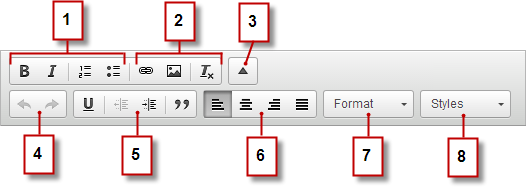
As a contributor, you can use the inline editor to edit any editable text areas on
the page. Editable areas display a gray border when you hover over the text.
Required Editions
Available in: Salesforce Classic
Available for purchase in: Enterprise, Performance,
and Unlimited Editions
Available (with limitations) in:
Developer Edition
Expand the toolbar (3) to access additional options (4–8).
Undo and redo your edits (4).
Control the text style and layout (5) by:
Applying underline formatting
Setting text alignment
Applying blockquote formatting
Set paragraph indentation (6).
Apply paragraph and heading styles (7).
Apply additional styles, such as highlighting (8).
Tip Avoid applying formatting, such as different fonts or highlighting,
directly to text whenever possible. Instead, it’s best practice to use the paragraph
and heading styles to quickly apply consistent formatting throughout the site. Using
paragraph and heading styles also ensures that all page text is updated
automatically if a site administrator or designer modifies these styles.
We use three kinds of cookies on our websites: required, functional, and advertising. You can choose whether functional and advertising cookies apply. Click on the different cookie categories to find out more about each category and to change the default settings.
Privacy Statement
Required Cookies
Always Active
Required cookies are necessary for basic website functionality. Some examples include: session cookies needed to transmit the website, authentication cookies, and security cookies.
Functional Cookies
Functional cookies enhance functions, performance, and services on the website. Some examples include: cookies used to analyze site traffic, cookies used for market research, and cookies used to display advertising that is not directed to a particular individual.
Advertising Cookies
Advertising cookies track activity across websites in order to understand a viewer’s interests, and direct them specific marketing. Some examples include: cookies used for remarketing, or interest-based advertising.