
Site.com Page Templates Overview
Before you begin building the pages of your website, take some time to plan the pages you need, and in particular, which pages have a similar layout. When you've decided on the layout, the quickest method is to use a page template to build the basic layout.
Required Editions
| Available in: Salesforce Classic |
Available for purchase in: Enterprise, Performance, and Unlimited Editions Available (with limitations) in: Developer Edition |
About Page Templates
A page template lets you define the layout and functionality of site pages in one location. By adding common page elements to the template and then basing site pages on it, you can achieve a consistent look and feel throughout your site. Page templates don't appear on your public site.
As the template creator, you specify which elements users can edit in pages based on the template. By default, a page element in a template is “locked,” so users can't edit its contents in any template-based page unless you mark the page element as “editable.” Conversely, when users edit an editable page element in a template-based page, their changes are specific to that page and don't affect your template.
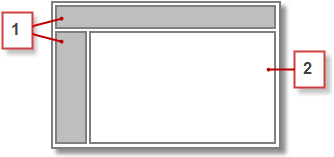
For example, this main page template contains a non-editable header and navigation menu that are common to all the pages in the site (1). The main template also has an editable center panel (2) to house the page-specific content of each page that's based on it.

- Page templates must contain at least one editable page element. Otherwise, users can't edit site pages that are based on the template.
- Panels are ideal for adding editable areas to page templates.
You can use page templates to:
- Save time and effort by laying out the page structure and using it as a starting point when you create site pages. For example, you could design a template with a fixed header panel and side menu, and an editable center panel, to which you add page-specific page elements and content.
- Quickly make global updates to the layout or style of your website, as any changes you make to the template's design are reflected immediately in all the pages that use it.
- Control how other users (such as contributors or other site administrators and designers) can modify site pages. For example, you can allow contributors to edit specific content blocks only.
- Ensure your template design remains pixel-perfect. When users edit a page that's based on a template, their changes don't affect your template.
- Reuse common design elements by creating child templates.
- Allow contributors to create site pages that are based on the template.
About Child Templates
Child templates are a useful way to reuse common design elements for more complicated page layouts. For example, your website probably has elements that are the same on every page in your site, such as a navigation menu. However, several pages can have elements that are common only to them, such as pages in a subsection of your site that include a subsection header. By using a child template, which is a template that's based on another template, you can reuse the main template design.
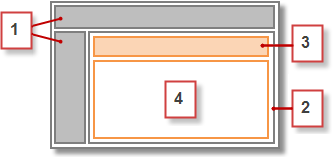
Using our main page template as a base, the child template inherits the non-editable header and navigation menu (1), and an editable center panel (2) where we add the non-editable subsection header (3). We must also add a new editable center panel (4) because the center panel of the main template is editable only in pages directly based on the main template.
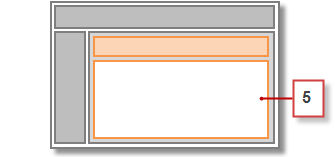
Now, any page based on the child template includes the non-editable main header, navigation menu, and subsection header, and an editable center panel (5) for that page's content.
Best Practices
- Plan your site structure and the layout of your pages. Taking the time to plan your website first saves time when you build your site.
- Identify which elements are common to all the pages of your site, such as navigation menus or headers, as these elements can be added to the page template.
- Use page templates wherever possible to promote content reuse and save time.
- Try to keep the design of your main page template as simple as possible to make it easier to modify in the future. For more complicated site designs, use child templates to achieve maximum flexibility.
