
You are here:
View and Manage Your Permission Set Licenses
View information about the permission set licenses that you purchased and manage user assignments.
Required Editions
| Available in: both Salesforce Classic and Lightning Experience |
| Available in: Professional, Enterprise, Performance, Unlimited, and Developer Editions |
| User Permissions Needed | |
|---|---|
| To view permission set licenses: | View Setup and Configuration |
To learn how to check your remaining licenses, watch  How Many Licenses Have I Used?
(English Only).
How Many Licenses Have I Used?
(English Only).
- From Setup, in the Quick Find box, enter Company Information, and then select Company Information.
-
View the Permission Set Licenses related list.
 Note When you add licenses, remove licenses, activate users, or deactivate users, it can take Salesforce up to 24 hours to refresh the license count shown on the Company Information page. If more than 24 hours have passed since you made changes and the number of licenses on the Company Information page still appears to be incorrect, contact Salesforce Customer Support.
 -
Click the name of the permission set license to see more details. On this page, you can
see information on available seats and the permissions included in the license.
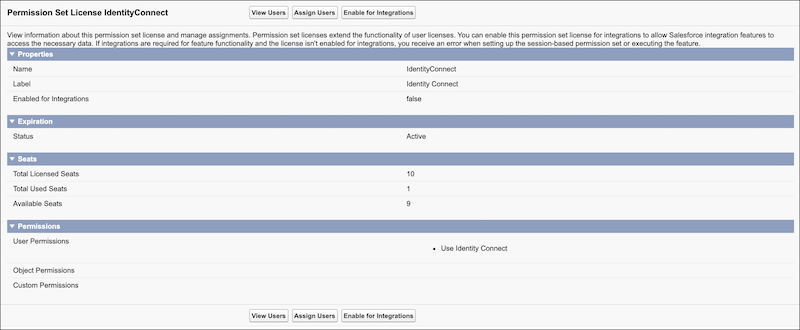
- To view users already assigned to this permission set license, click View Users.
- To assign users to the license, click Assign Users. You can assign multiple users at the same time.
-
Optionally, to enable this permission set license for integrations and allow Salesforce
integration features to access data, click Enable for
Integrations.
Note If integrations are required for feature functionality and the license isn't enabled for integrations, you receive an error when setting up the session-based permission set or executing the feature. Only enable integrations if necessary for the feature.
For information on purchasing permission set licenses, contact your Salesforce account representative.
Did this article solve your issue?
Let us know so we can improve!
