
You are here:
View Which Users Have Access to Your Records in Salesforce Classic
Identify users who have been granted access through sharing. The list includes their access level and an explanation and shows every user who has access that’s greater than the org-wide default settings.
Required Editions
| Available in: Salesforce Classic |
| Available in: Professional, Enterprise, Performance, Unlimited, and Developer Editions |

Note
Some sharing rules specify access to an object and its associated
objects. For sharing rules that specify access for associated object records, the given
access level applies to that sharing rule only. For example, if an account sharing rule
specifies Private as the access level for associated contacts, a user can access
associated contacts via other means. These means include org-wide defaults, the Modify All
Data or View All Data permission, or the Modify All Records or View All Records permission
for contacts.
-
To display a list of users who have access, click Sharing on the
desired record.
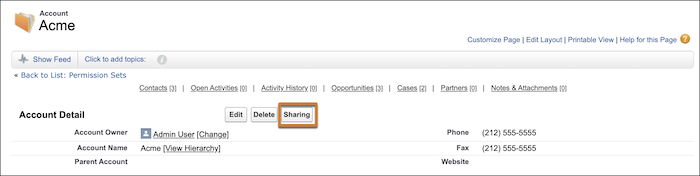
- To see full details about who has access to this record, click Expand List.
- To see the reason the user has access to the record, click Why? next to a user’s name. If there are multiple reasons with different access levels, the user is always granted the most permissive access level. The possible reasons are:
| Reason | Description |
|---|---|
| Account Guest Sharing Rule | The guest user has access via an account guest user sharing rule created by the administrator. |
| Account Sharing Rule | The user has access via an account sharing rule created by the administrator. |
| Account Sharing | The user was granted access via the Sharing button on the associated account. |
| Account Team | The user is a member of the account team. |
| Account Territory | The account has been assigned to a territory to which the user has access. |
| Administrator | The user has the “Modify All Data” or “View All Data” administrative permission, or the “Modify All Records” or “View All Records” object permission. |
| Asset Guest Sharing Rule | The guest user has access via an asset guest user sharing rule created by the administrator. |
| Asset Sharing Rule | The user has access via an asset sharing rule created by the administrator. |
| Associated Guest User Sharing | The guest user has sharing access to a record associated with the account. To view which associated records the user owns or has been given sharing access to, click the link |
| Associated Portal User or Role | The portal or site user, or any role above the portal or site user's role, has access to the account for which the portal or site user is a contact. |
| Associated Record Owner or Sharing | The user owns or has sharing access to a contact or contract associated with the account. To view which associated records the user owns or has been given sharing access to, click the link. |
| Associated Record Sharing | The user is a member of a share group that has access to a contact or contract that's associated with the account owned by high-volume Experience Cloud site users. |
| Campaign Guest Sharing Rule | The guest user has access via a campaign guest user sharing rule created by the administrator. |
| Campaign Sharing Rule | The user has access via a campaign sharing rule created by the administrator. |
| Case Guest Sharing Rule | The guest user has access via a case guest user sharing rule created by the administrator. |
| Case Sharing Rule | The user has access via a case sharing rule created by the administrator. |
| Contact Guest Sharing Rule | The guest user has access via a contact guest user sharing rule created by the administrator. |
| Contact Sharing Rule | The user has access via a contact sharing rule created by the administrator. |
| Group Member | The user has access via a group, such as a Managers Group or Manager Subordinates Group. |
| Individual Guest Sharing Rule | The guest user has access via an individual guest user sharing rule created by the administrator. |
| Individual Sharing Rule | The user has access via an individual sharing rule created by the administrator. |
| Lead Guest Sharing Rule | The guest user has access via a lead guest user sharing rule created by the administrator. |
| Lead Sharing Rule | The user has access via a lead sharing rule created by the administrator. |
| Manager of Territory Member | The user has subordinates within the role hierarchy. Those subordinates have access to records assigned to their territories or to territories above them within the hierarchy. |
| Manual Sharing | The user has access that was granted via the Sharing button on the record. |
| Manual Territory Sharing | The account has been manually assigned to a territory to which the user has access. |
| Opportunity Guest Sharing Rule | The guest user has access via an opportunity guest user sharing rule created by the administrator. |
| Opportunity Sharing Rule | The user has access via an opportunity sharing rule created by the administrator. |
| Order Guest Sharing Rule | The guest user has access via an order guest user sharing rule created by the administrator. |
| Order Sharing Rule | The user has access via an order sharing rule created by the administrator. |
| Owner | The user owns the record, or the user is a member of the queue that owns the record or above the queue member in the role hierarchy. |
| Portal Share Group | The user is a member of a share group that has access to records owned by high-volume Experience Cloud site users. |
| Related Portal User | The portal or site user is a contact on the case. |
| Role Above Owner or Shared User (Portal Only) | The user's role is above the role of a portal or site user who has access to the record via ownership or sharing. |
| Sales Team | The user is a member of the opportunity sales team. |
| User Sharing Rule | The user has access via a user sharing rule created by the administrator. |
| User Guest Sharing Rule | The guest user has access via a user guest user sharing rule created by the administrator. |
| View All Forecasts Permission | The forecasts user has the View All Forecasts permission. |
If a user has access to a record as a result of multiple sharing reasons, some reasons are compressed into a single record. That record contains the highest level of permission. The compressed reasons are: Associated Portal User or Role, Associated Record Owner or Sharing, Manual Sharing, and Owner. For example, if a user owns opportunities associated with an account and was also manually given access to that account, the user is listed only one time on sharing pages.
Did this article solve your issue?
Let us know so we can improve!
