Before you activate your rating procedure, run simulations to test if the variables that
you entered are accurate. If your rating procedure doesn’t work as expected, edit the values that
you entered and try again. When you’re satisfied, activate the rating procedure
version.
From the App Launcher, find and select Rating Procedures.
To open the rating procedure record, click the procedure name.
To open the rating procedure in the Rating Procedure builder, click the rating procedure
version name.
Add your elements, map them to the appropriate tags, choose a rank, enable the option to
include in output, and then save your rating procedure.
Click Simulate.
Salesforce
shows the Simulation Details with the input mode selected as Simplified by default.
If necessary, change the input mode.
Simplified
To define values for the variables in the fields corresponding to each
variable.
Advanced
To define values for the variables in the JSON format. You can modify the values
directly or download the JSON input file, modify its values, and paste the file back in the
JSON Input box.
Enter values for the input variables.
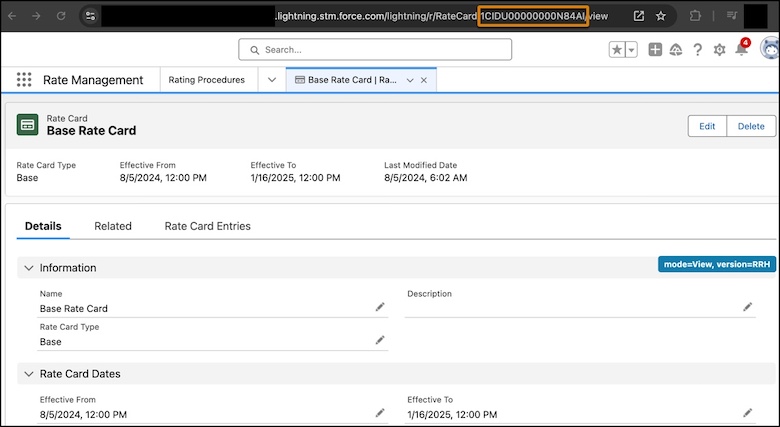
To locate the value of a variable, go to the related record. For example, to locate a rate
card ID, open the rate card record page. The rate card ID appears in the browser’s URL.
In the Input tab, click Simulate.
The Waterfall View shows every step of the rating calculation that determine the
resource's final net rate.
When you’re happy with the simulation result, click Activate.
Did this article solve your issue?
Let us know so we can improve!
Loading
Salesforce Help | Article
Cookie Consent Manager
General Information
Required Cookies
Functional Cookies
Advertising Cookies
General Information
We use three kinds of cookies on our websites: required, functional, and advertising. You can choose whether functional and advertising cookies apply. Click on the different cookie categories to find out more about each category and to change the default settings.
Privacy Statement
Required Cookies
Always Active
Required cookies are necessary for basic website functionality. Some examples include: session cookies needed to transmit the website, authentication cookies, and security cookies.
Functional Cookies
Functional cookies enhance functions, performance, and services on the website. Some examples include: cookies used to analyze site traffic, cookies used for market research, and cookies used to display advertising that is not directed to a particular individual.
Advertising Cookies
Advertising cookies track activity across websites in order to understand a viewer’s interests, and direct them specific marketing. Some examples include: cookies used for remarketing, or interest-based advertising.