
You are here:
Review the Activities Analytics Dashboard
Review the Activities Analytics Dashboard to review Einstein Activity Capture license or permission.
Required Editions
| Available in: Lightning Experience |
| Available with Sales in: Professional (when API access is purchased), Enterprise, Performance, and Unlimited Editions |
| Available with Sales Cloud Einstein, which is available for an extra cost in: Enterprise, Performance, and Unlimited Editions |
| Available with Inbox, which is available for an extra cost in: Professional (when API access is purchased), Enterprise, Performance, and Unlimited Editions |
| Available with Sales Engagement, which is available for an extra cost in: Enterprise, Performance, and Unlimited Editions |

| User Permissions Needed | |
|---|---|
| To view the Activities app and dashboard: | Use Einstein Activity Capture AND Use CRM Analytics Templated Apps OR Access to View-Only Licensed Templates and Apps |
| To create CRM Analytics apps using the Activities app template: | Use Einstein Activity Capture AND Manage CRM Analytics Templated Apps |
| To delete or reset the Activities app: | Manage CRM Analytics Templated Apps |

Click the tab that corresponds with your Einstein Activity Capture license or permission.
- If you have the Standard Einstein Activity Capture permission set, click the Activities Dashboard tab. You see a read-only version of the dashboard.
- If you’re an Inbox user with the Access to View-Only Licensed Templates and Apps permission, which is included with the Inbox With Einstein Activity Capture permission set, click the Activities Dashboard tab. You see a read-only version of the dashboard.
- If you’re an Inbox user with the Analytics for Sales Cloud permission set, click the Analytics tab. Or, open Analytics Studio, and click the Activities app.
- If you’re a Sales Cloud Einstein or Sales Engagement user, click the Analytics tab. Or, open Analytics Studio, and click the Activities app.
Users with read-only access can view the dashboard and use the filters, but they can’t clone or edit the dashboard.
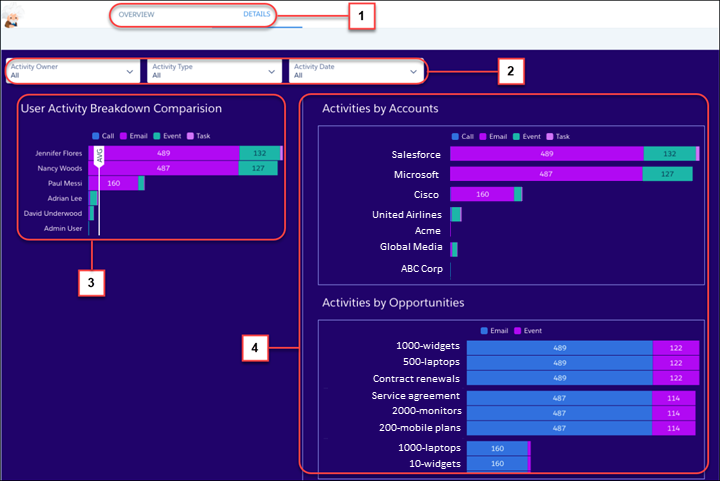
Charts are organized by tabs (1). Use filters (2) to view information about specific activity owners, activity types, and dates. Quickly view which of the selected users are most active (3). The Details tab includes charts that break down activities by accounts and opportunities (4).
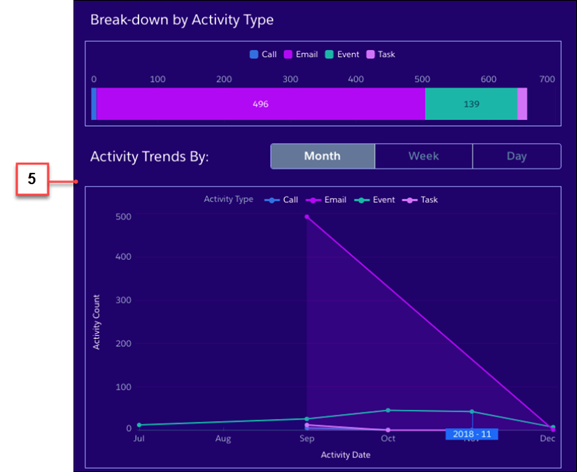
The Overview tab lets you see how each activity type is trending over the past month, week, or day (5). Licensed Einstein Activity Capture users see up to 180 days of activity data. Einstein Activity Capture Standard users see up to 90 days of activity data.
