
You are here:
Connect to Einstein Activity Capture with a Google Workspace Marketplace App
You can use the Salesforce Einstein Activity Capture app on Google Workspace Marketplace as an authentication method. This method provides controlled access to your Google servers while letting you manage users directly in the Google Workspace Marketplace app.
Required Editions
| Available in: Lightning Experience |
| Available with Einstein Activity Capture Standard in Sales in Starter, Pro Suite, Professional, and Enterprise Editions |
| Available with Unlimited Edition, Einstein 1 Sales Edition, and Agentforce 1 Edition |
| Available with Einstein for Sales, which is included in Einstein 1 Sales Edition and available for an extra cost in Enterprise and Unlimited Editions |
| Available with Sales Engagement, which is included with Sales in Performance and Unlimited Editions, and available for an extra cost in Professional and Enterprise Editions |
| Available with Revenue Intelligence, which is available for an extra cost in Enterprise and Unlimited Editions |

Note We’re reorganizing the Einstein Activity Capture documentation. We’re
moving some information around, but we aren’t deleting anything.
| User Permissions Needed | |
|---|---|
| To connect Salesforce to Google: | Customize Application OR Modify All Data |
| To view the Einstein Activity Capture setup pages: | View Setup and Configurations AND Customize Application OR Modify All Data |
Before you start, make sure that you have global administrator access to your company’s Google account. As a Google global administrator, you directly control what data this Einstein Activity Capture integration can access, and for whom.
- Log in to Google Workspace Admin console at https://admin.google.com/.
- In the Google Workspace Admin console, create an access group to contain the Einstein Activity Capture users if you don’t have one already.
- In the Google access group, add the members that have the user accounts that you want to integrate with Einstein Activity Capture.
- In Salesforce Setup, in the Quick Find box, enter Einstein Activity Capture, and then select Settings. If it’s your first time setting up Einstein Activity Capture, the setup flow guides you through the steps. If you already set up Einstein Activity Capture and want to change the authentication method, reset Einstein Activity Capture.
- Select Google G Suite as the email and calendar application.
- Select Google Workspace Marketplace App as your authentication method.
-
Click Install App to install the Einstein Activity Capture app from
Google Workspace Marketplace.
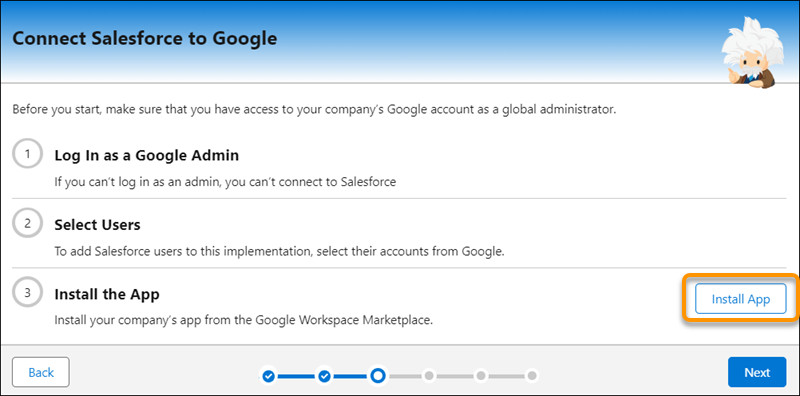
- In Google Workspace, select Admin install and then Continue.
- Install the app only for the access group you created in step 2. In Google Workspace, select Certain groups or organizational units and follow the prompts to select and save your access group selection.
- In Salesforce, click Next.
- Follow the remaining Einstein Activity Capture setup steps, including creating a configuration and adding users to it.
When you use the Google Workspace Marketplace app authentication method:
- It can take up to 24 hours to establish the connection with your Google Workspace environment. When ready, the connection is listed on each Einstein Activity Capture user’s Connected Accounts page.
- Users who are in configurations with emails enabled are prompted to accept the Einstein Activity Capture terms of service. Until they do, email data isn’t captured.
- Users who have access to Inbox must connect an account for Inbox to work. Users can connect their primary account or a different account.
Did this article solve your issue?
Let us know so we can improve!
