To help you prioritize your records based on activity
and opportunity data, the Account Intelligence view adds more capabilities to the standard list
view. See account activity, scan vital opportunity metrics, review cases, and log activities,
all in one dedicated workspace.
Required Editions
Available in: Lightning Experience
Available with Sales in: Professional, Enterprise,
Performance, and Unlimited Editions
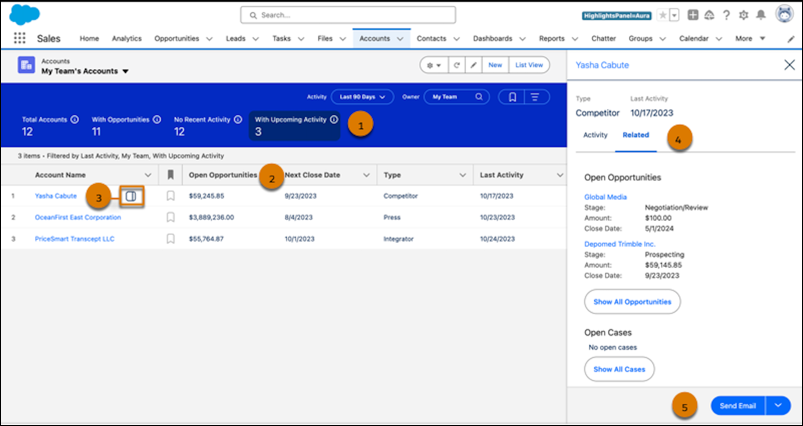
You can quickly filter your accounts with one click (1), see opportunity metrics at a
glance (2), and identify recently active accounts in one dedicated workspace. To see
detailed activity and related records for individual accounts, click the side panel icon (3)
next to the account name. Review related case and opportunity records (4), log tasks or send
emails (5) right from the side panel.
Account metrics include these details.
Total Accounts: The total number of accounts that meet your filter criteria.
With Opportunities: The number of accounts with open opportunities.
No Recent Activity: The number of accounts with no activities completed in the last 30 days.
With Upcoming Activity: The number of accounts with activities scheduled in the next 30 days.
Personalize your list view by creating filters and selecting which fields to show. To ensure your filter criteria persist, set them in the filter panel with the with the Show Filters button.
Turn On the Account Intelligence View To view account activities, see vital account metrics, and access related records in one dedicated workspace, turn on the Account Intelligence view.
We use three kinds of cookies on our websites: required, functional, and advertising. You can choose whether functional and advertising cookies apply. Click on the different cookie categories to find out more about each category and to change the default settings.
Privacy Statement
Required Cookies
Always Active
Required cookies are necessary for basic website functionality. Some examples include: session cookies needed to transmit the website, authentication cookies, and security cookies.
Functional Cookies
Functional cookies enhance functions, performance, and services on the website. Some examples include: cookies used to analyze site traffic, cookies used for market research, and cookies used to display advertising that is not directed to a particular individual.
Advertising Cookies
Advertising cookies track activity across websites in order to understand a viewer’s interests, and direct them specific marketing. Some examples include: cookies used for remarketing, or interest-based advertising.