
You are here:
Considerations for the Account Intelligence View
Get the most out of the Account Intelligence view by first reviewing some important considerations.
Required Editions
| Available in: Lightning Experience |
| Available with Sales in: Professional, Enterprise, Performance, and Unlimited Editions |

Important Starting in Summer ’25, Activity 360 Reporting,
Activity Metrics, and Activities Analytics Dashboard aren’t available unless previously set
up. Additionally, data from these reporting tools that appear in other features, including
Close Plan, Pipeline Inspection, and Einstein Conversation Insights isn’t available unless
configured before Summer ’25. If you’re already using Activity 360 Reporting, Activity
Metrics, Activities Analytics Dashboard, or related data, you can continue to do so until
these tools are retired in Summer ’26. To explore email data added by Einstein Activity
Capture after Summer ’25, make sure you sync email as salesforce activity and use Salesforce
Activity reports. See Considerations for Sync Email as Activity and Einstein Activity Capture Activity 360 Reporting, Activity
Metrics, Activities Dashboard Upcoming Retirement (Summer ’26).
Einstein Features and Activity Metrics
- You can see manually logged activities in the side panel without using Einstein Activity Capture.
- To see the complete timeline of your interactions with each account and to ensure your metrics are fully logged, set up Einstein Activity Capture with Activity Metrics, Activity 360 Reporting, or both.
- To see counts of recent activities in the side panel, set up Einstein Activity Capture with Activity Metrics, Activity 360 Reporting, or both. If you enable both, the counts come from Activity 360 Reporting.
- If Sync Email as Salesforce Activity is enabled, Activity 360 Reporting and Activity Metrics aren't available.
Last Activity
The dates in the Last Activity field in the side panel and in the Last Activity or Last Activity Date column on the main Intelligence view depend on which features you enable.
- When both Einstein Activity Capture and Activity Metrics are enabled, dates come from Activity Metrics. The available Intelligence view columns are Last Activity Date and Next Activity Date.
- When Einstein Activity Capture isn’t enabled, dates come from the standard Last Activity field on the Account object. The available Intelligence view column is Last Activity. Metrics for Next Activity aren’t available.
- If Einstein Activity Capture is enabled but Activity Metrics is disabled, the Last Activity field in the side panel is hidden. Dates come from the standard Last Activity field on the Account object, and the available Intelligence view column is Last Activity. Metrics for Next Activity aren’t available.
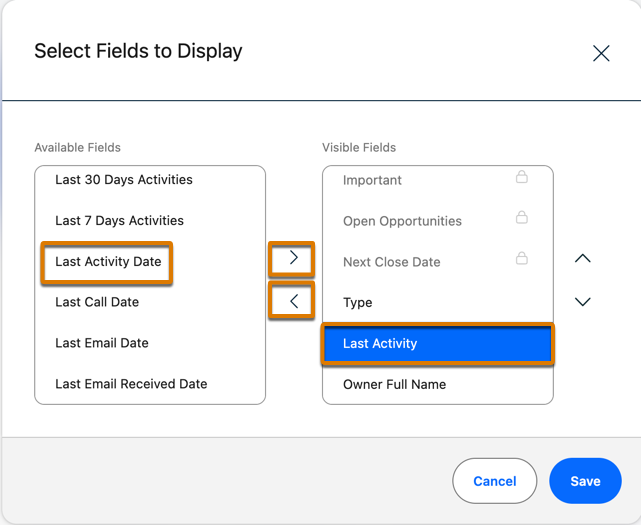
- If you turn on Einstein Activity Capture with Activity Metrics after creating Account
Intelligence views, update the view columns to reflect the Einstein metrics. Manually
replace the Last Activity column in the view with the Last Activity Date column, and
optionally add the Next Activity Date field to the view. Any new views you create after
enabling Activity Metrics automatically have the columns derived from Activity Metrics.
Person Accounts and Last Activity
- If you use Person Accounts, activities related to the current Person Account through Contacts are shown in the side panel. However, the Last Activity date is based only on activities that are related to the Person Account via the Account entity.
Did this article solve your issue?
Let us know so we can improve!
