
You are here:
Strategic Tracker with Sales Action Plans
Give your sales team members specific steps to complete as they work toward completing account plan objectives. Each objective’s Strategic Tracker uses sales action plans to organize the tasks and events that you want team members to complete.
Required Editions
| Available in: Lightning Experience |
| Available in: Enterprise, Performance, and Unlimited editions with Sales and in Agentforce 1 Sales Edition |
Sales Action Plans and Sales Action Plan Templates
Sales action plans extend Industries action plans and use the same standard objects, but they add a unique item type: Event. To get started with sales action plans, your Salesforce admin first assigns permissions and sets up sales action plan templates.
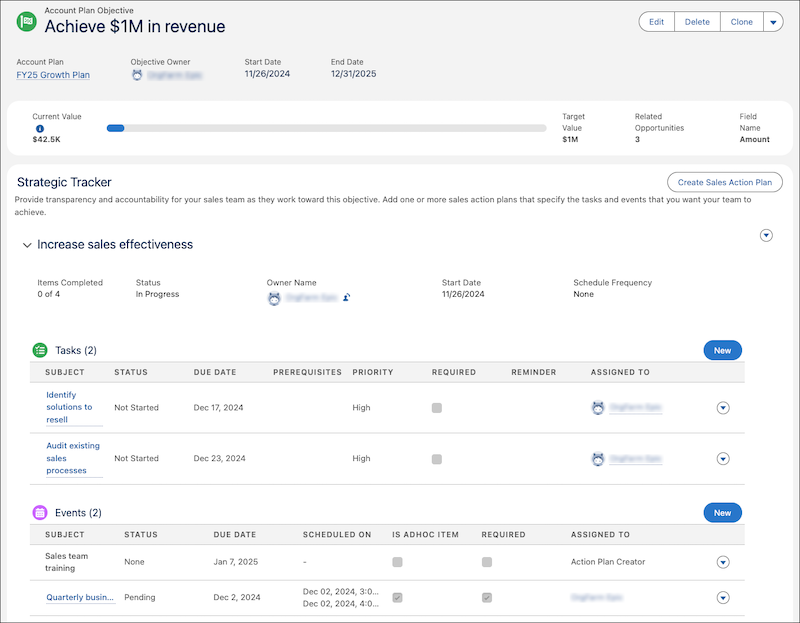

To add sales action plans for the Strategic Tracker on your account plan objectives, your sales action plan templates require these values.
- Action Plan Type is Sales.
- Target Object is Account Plan Objective.
Two default sales action plan templates with these values are available. Use these default templates, or clone and modify them for your needs.
For more information about setting up sales action plans, see Turn On Sales Action Plans. For more information about how Industries action plans work, see Work with Action Plans and Templates.
Limits
Keep these limits in mind when adding sales action plans to an account plan objective’s Strategic Tracker.
- Each objective has one Strategic Tracker section.
- Each Strategic Tracker section can have multiple sales action plans.
- Each sales action plan can contain up to 100 tasks and 100 events.
- Strategic Tracker tasks that are updated by a flow require a page refresh.
Examples
To help you get started with Strategic Trackers and sales action plans for your account plan objectives, review these examples.
| Objective | Strategic Trackers | Sales Action Plan Items |
|---|---|---|
| Increase EMEA sales by 20%. | Improve sales effectiveness |
|
| Hire 40 new sales team members |
|
|
| Grow customer loyalty with exceptional service and support. | Accelerate customer support and engagement activities |
|
