You are here:
Authentication and Data Flow
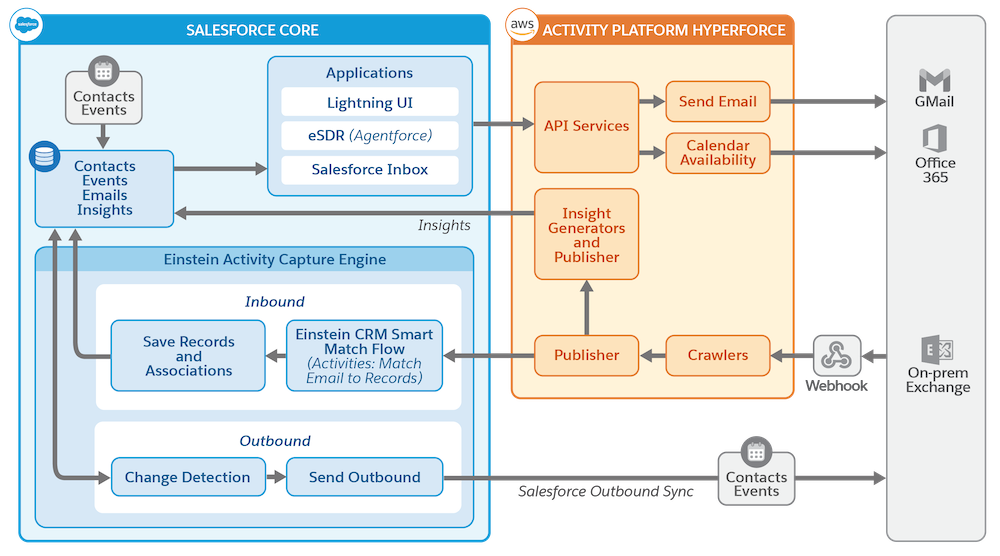
Einstein Activity Capture uses secure authentication and data flow to protect sensitive data, such as emails, calendar events, and contacts.
Required Editions
| Available in: Lightning Experience |
| Available with Einstein Activity Capture Standard in Sales in Starter, Pro Suite, Professional, and Enterprise Editions |
| Available with Unlimited Edition, Einstein 1 Sales Edition, and Agentforce 1 Edition |
| Available with Einstein for Sales, which is included in Einstein 1 Sales Edition and available for an extra cost in Enterprise and Unlimited Editions |
| Available with Sales Engagement, which is included with Sales in Performance and Unlimited Editions, and available for an extra cost in Professional and Enterprise Editions |
| Available with Revenue Intelligence, which is available for an extra cost in Enterprise and Unlimited Editions |

Einstein Activity Capture uses secure OAuth 2.0 flows to connect to email accounts in Microsoft Office 365 and Google. Users or admins grant Salesforce limited access to their mailboxes. Authentication occurs at two levels.
- Org-level or application-level authentication: An admin authenticates all users in the org.
- User-level authentication: Users connect their own accounts.
Einstein Activity Capture supports these connected accounts.
- Microsoft Office 365: When admins configure Einstein Activity Capture to use Microsoft
Office 365, Salesforce redirects them to the Microsoft login page. Salesforce admins work
with Azure admins to authorize Einstein Activity Capture to get the required permissions to
consent the connection. After admins give consent, Einstein Activity Capture receives an
OAuth token to access the mailbox. Salesforce stores the OAuth refresh token, not the user’s
password. Einstein Activity Capture authenticates Microsoft 365 connections through the
Microsoft Graph API.
 Important
Microsoft is retiring Exchange Web Services (EWS) for Microsoft Office 365 in October 2026. Upgrade your Microsoft Office 365 authentication to Microsoft Graph. See Upgrade Microsoft Office 365 Authentication Method to Microsoft Graph.
- Google Gmail
- Google’s OAuth: The user or admin consents to scopes such as Gmail read-only, Calendar read, and Contacts, if applicable. Salesforce stores a token.
- Marketplace app: Limited data access to the application level, such as emails, events, and contact.
- Microsoft On-Prem Exchange: If your org uses on-premises Exchange, authentication routes
through Microsoft Entra ID (formerly Azure AD) or certificate-based authentication via a
service account. It also supports user-level authentication. Basic authentication with a
username and password isn’t used. Note Hybrid deployments aren’t supported.
All connections use token-based authentication with the email provider, except for Microsoft On-Prem Exchange. Users or admins can revoke these tokens at any time.
Connection and authentication methods depend on which email and calendar applications you use. For details, see Connect Email and Calendar Accounts to Einstein Activity Capture.
The connection grants Salesforce access to read, send, delete, and manage emails and to manage contacts and calendars. Salesforce also views files in Google Drive, if applicable.
Data Flow
Data retrieval: After they’re connected, Einstein Activity Capture subscribes to mailbox events.
- Exchange and Microsoft 365: Einstein Activity Capture uses the Microsoft Graph API for Microsoft 365 and EWS for Exchange to detect when new emails or events arrive in the user’s mailbox. These notifications trigger Einstein Activity Capture to retrieve the new item’s details.
- Gmail: Einstein Activity Capture uses Gmail push notifications or periodic polling to detect new emails and the Google Calendar API for events.
Firewall considerations: If your company restricts outbound connections, make sure that the Einstein Activity Capture webhook endpoints are a part of the allowlist. Einstein Activity Capture uses specific endpoints to receive change notifications from Microsoft or Google. For a list of endpoint URLs to allowlist, see the Salesforce documentation.
When contacts or events move only from Salesforce to the connected account, the Activity Platform Hyperforce servers don’t store any data.