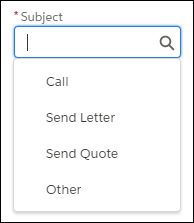
Reps can create tasks and events faster with predefined subject values. A Salesforce
admin defines subject values based on what’s most useful to reps.
Required Editions
Available in: All Editions
When reps create tasks and events, they can choose a predefined subject, such as Call, Send
Letter, or Send Quote.
These subjects let reps organize and sort their tasks based on what the tasks are. Without
having to enter the type of task, reps can focus on adding details to describe the task.
Example By customizing the predefined subject, a rep can choose “Call” and then add, say,
“confirmed presentation this Friday”.
Later, when a sales manager is searching for a task,
they don’t have to wonder how the rep named the task, such as “Phone”, “Office call”, or
“Follow-up call”. The common entry—Call—makes it much easier to do a search.
We use three kinds of cookies on our websites: required, functional, and advertising. You can choose whether functional and advertising cookies apply. Click on the different cookie categories to find out more about each category and to change the default settings.
Privacy Statement
Required Cookies
Always Active
Required cookies are necessary for basic website functionality. Some examples include: session cookies needed to transmit the website, authentication cookies, and security cookies.
Functional Cookies
Functional cookies enhance functions, performance, and services on the website. Some examples include: cookies used to analyze site traffic, cookies used for market research, and cookies used to display advertising that is not directed to a particular individual.
Advertising Cookies
Advertising cookies track activity across websites in order to understand a viewer’s interests, and direct them specific marketing. Some examples include: cookies used for remarketing, or interest-based advertising.