
You are here:
Set Up Automatic Contact Enhancements
Turn on Automatic Contact Enhancements, add fields to the contact record layout and list views, and recognize when the feature is on.
Required Editions
| Available in: Lightning Experience |
| Available in: Professional, Enterprise, Performance, Unlimited, and Developer Editions with Sales, and Agentforce 1 Sales Edition |
| User Permissions Needed | |
|---|---|
| To enable or disable Automatic Contact Enhancements: | View Setup and Configurations AND Customize Application |
| To view the Automatic Contact Enhancements setup page: | View Setup and Configurations |

Tip Check
out this feature in Salesforce Go! Find a guided setup experience, explore more content,
discover related features, and monitor feature usage. See Discover and Set Up Features With Salesforce Go.
Before you start, check that you’ve met the requirements in Considerations for Automatic Contact Enhancements.
- Enable Einstein Generative AI in Setup.
- If you haven’t already, enable Einstein Activity Capture.
- From Setup, enter Contact Creation Automation in the Quick Find box, and select it.
- Turn on Automatic Contact Enhancements.
-
To see the Buyer Attributes, Department Group, and Seniority Level fields on the contact
record, add the fields to the Contact record layout. You can also add them to list views. Buyer
Attributes, Department Group, and Seniority Level fields are available with all profiles except
custom and minimum-access. To provide access, use field-level security in Object Manager.
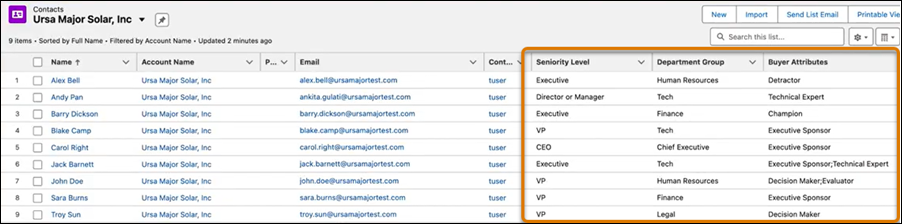
Automatic Contact Enhancements starts updating your contact records from your new email interactions and up to 4 historical email interactions. For a list of fields that are updated, see Considerations for Automatic Contact Enhancements.
An indicator on contact records shows that the feature is on.
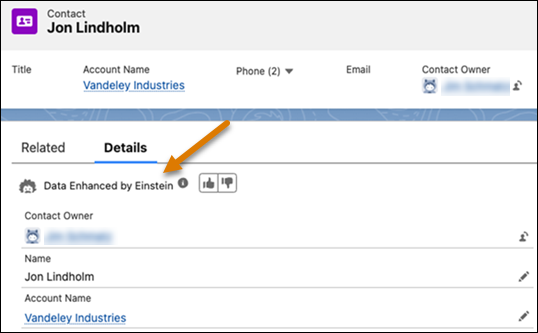

Note If your org uses custom Contact record pages, the indicator may not appear automatically.
To display it, add the Sales Einstein GPT for Contacts component to the page using
Lightning App Builder.
Did this article solve your issue?
Let us know so we can improve!
