
You are here:
Roll-Up Summary Fields and Salesforce Billing Automation
When you update a roll-up summary field, Salesforce triggers automation that runs off update triggers on the field’s object. Because Salesforce Billing uses many automated processes, we recommend thoroughly testing custom roll-up summaries and custom automation. That way, you reduce the risk of triggering a large number of automated processes, which can impact performance. (Salesforce Billing Managed Package)

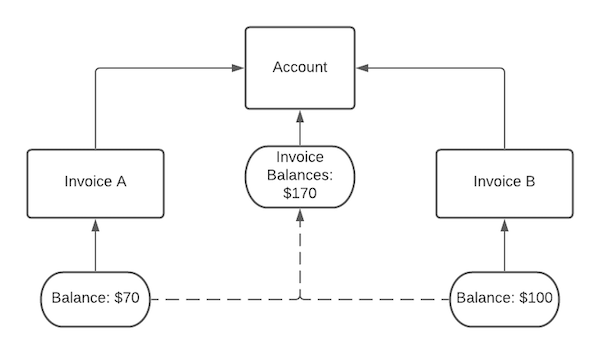
When a customer makes a payment against an invoice, Salesforce Billing updates the invoice’s balance. The balance update triggers an update on the account’s Invoice Balances field. For example, if you make a $30 payment against your second invoice, the update causes the accounts Invoice Balances field to recalculate to $140. Whenever a rollup summary field updates, Salesforce triggers all automation that runs off updates on the same object. These types of automation include workflow rules, process builders, flows, validation rules, approval processes, and filtered lookups.
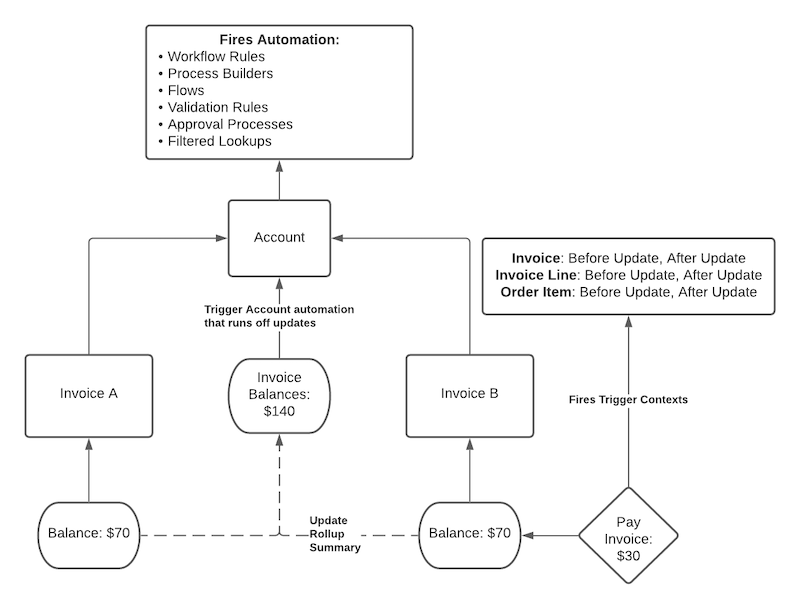
If you use an automated process to pay many invoices at the same time, such as a payment run, your account-level automation triggers would add up quickly. Let's say your account uses three custom update-based workflow rules and three custom update-based validation rules. If a payment run evaluates and pays 50 invoices, the resulting Invoice Balance updates trigger 300 instances of your custom account automation. Depending on the complexity of your automation, you can encounter performance impacts as Salesforce Billing resolves each automated process.
To reduce the likelihood of performance impacts, we recommend testing custom rollup summaries and custom automation in a sandbox. Note any significant impact to CPU, row lock errors, and instances of trigger recursion.
