
You are here:
Getting Started With Electronic Payments
Salesforce Billing uses payment runs and the Payment Center to collect payments against recurring charges. Payment runs are automated processes that evaluate an account’s electronic payment method and use that method to make payments against invoices with outstanding balances. The Payment Center allows account handlers to make one-time payments against outstanding customer invoices. Before you begin using either method, review how Salesforce Billing handles customer payment data and sends it to external gateways and customer banks for processing. (Salesforce Billing Managed Package)
Payment methods store ACH or credit card details for a customer and a link to a Salesforce Billing payment gateway record. The Salesforce Billing payment gateway object contains specific details that Salesforce Billing must communicate with the actual payment gateway, which handles the financial requests made against the customer’s bank.
Payment gateway objects can be configured with different default and custom fields based on the information that the customer’s payment gateway requires. For example, certain payment gateways can require specific security keys or merchant credential information. Salesforce Billing also supports third-party payment gateway packages that install additional fields on the payment gateway object. These fields are unique to the package and are used to pass information to a specific external gateway. Although Salesforce Billing supports the custom fields that the package directly installs, not all custom payment gateway fields made by users are supported.
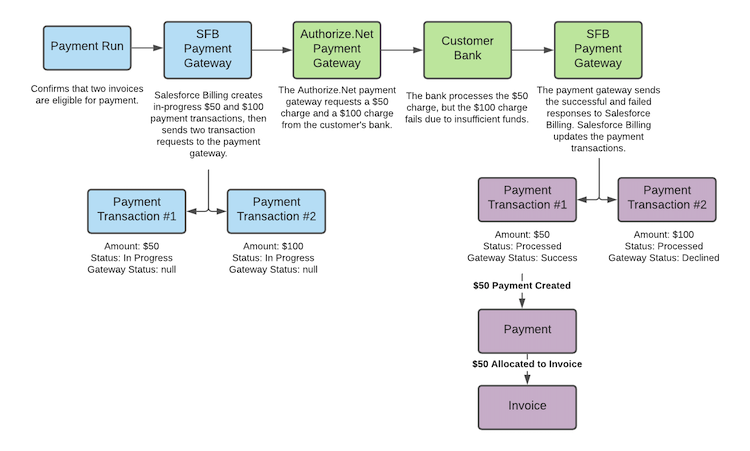
Salesforce Billing uses payment transaction records to record the results of gateway requests and responses. During payment runs, Salesforce Billing creates a transaction in an in-progress state before the request and then updates the transaction following the gateway’s response. During Payment Center applications, Salesforce Billing creates the transaction after the gateway’s response.
The payment transaction has several status fields that let you know whether the communication was successful, failed, or indeterminate. If the transaction wasn’t successful, you have several options for corrective action. We’ll take a detailed look at these options later. After the payment run has finished creating its transactions, Salesforce Billing evaluates the successful transactions and creates payment records. It then allocates the payments to their respective invoices.
At a general level, we can break down the electronic payment process into three steps.
- Finalizing the payment information in Salesforce Billing (Blue)
- Sending requests to the payment gateway and receiving the payment gateway’s responses (Green)
- Recording the results of the gateway communication in payment transactions and allocating payments for each successful transaction (Purple)
We’ll take a detailed look at each of these three processes in our next topics.
