
You are here:
Integrating Salesforce CPQ and Salesforce Billing
Salesforce Billing is an add-on package that inherits key records and information from Salesforce CPQ. After a sales rep finalizes a quote and orders it within Salesforce CPQ, Salesforce Billing picks up the order record for invoicing, payment, and revenue recognition. Before you integrate Salesforce Billing with Salesforce CPQ, review important features and differences between the packages. (Salesforce Billing Managed Package)
Required Editions
| Available in: All Salesforce Billing Editions |
- Salesforce CPQ Features
- Salesforce CPQ lets sales reps configure, price, and prorate items on a quote. They can then create a contract to record subscriptions for future sales transactions, amendments, and renewals. They can order the quote, which produces an order record in Salesforce CPQ. Each order contains order products, which represent quote lines that a customer has ordered. When you're ready to bill for an order, Salesforce Billing evaluates order and order product field to develop the invoice and related transactional records.
- Salesforce Billing Features
- Salesforce Billing lets you invoice an order and manage its balances through credit and debit notes. You can automate customer payments and process them manually or through a third-party payment gateway. You can also record all your transactional data into finance books and finance periods, then map that data into an external general ledger or ERP. We've also provided a revenue recognition reporting system that lets you account for revenue for a product you provide to a customer.
- Salesforce Billing contains several rules that define when and how it creates
transactional records. You define lookups to these fields on your product
records, which pass their rules to the resulting order products when a sales rep
orders a quote. Many order products can look up to the same rule, which lets you
consolidate groups of order products under one rule based on how you want
Salesforce Billing to handle them during invoicing events. Each rule also
contains treatment records, which allow Salesforce Billing to apply more
specific actions based on shared values between an order product and the
treatment. Let's look at a few important actions that rules control.
- Whether to create an invoice line for an order product, then how the invoice line's pricing and date values drive billing periods, billing dates, and billing cycles.
- Whether to create a revenue schedule and revenue transactions for an invoice line.
- Whether to calculate tax for an invoice line and how Salesforce Billing calculates tax based on tax integrations and tax data.
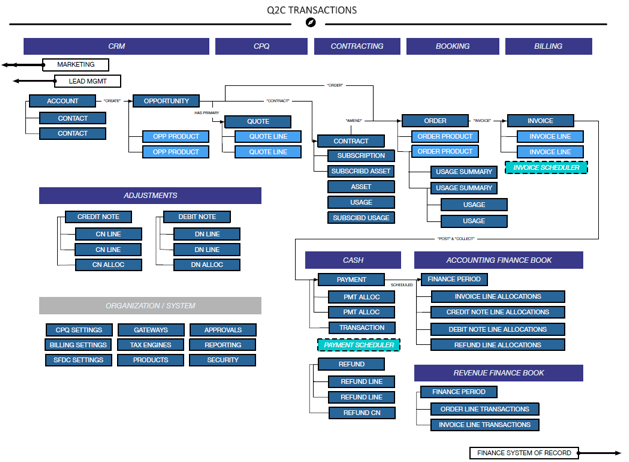
- This flowchart walks through a complete quote-to-cash process that begins with uses the CPQ platform for quote development, contracting, and booking, then moves to Salesforce Billing for invoicing, adjustments, cash flow, and finance books.
Use Cases
Let's look at a few common scenarios where Salesforce CPQ users can integrate Salesforce Billing.
- Quote-to-Invoice Development
- Universal Containers is familiar with CPQ functionality and are now looking to automate invoice creation and revenue schedules all on a single platform. This integration will decrease time spent on invoice review and validation compared to their current process. Revenue Schedule generation, coupled with time saved on administrative tasks, will allow for improved forecasting. Universal Containers will then integrate with their Finance System of Record for all other functionality, like payments.
- Quote-to-Cash with Automated Payment Deployment
- Universal Containers is familiar with CPQ functionality and are now looking to automate invoice creation and payments within Salesforce. Salesforce Billing offers various integrations with payment processing vendors. Applying Salesforce Billing’s built-in features and integrations will speed up payment collection, and improve cash flow. Universal Containers will then integrate to their Finance System of Record for any additional functionality, like Accounts Receivables.
Considerations
- Salesforce CPQ and Billing have independent proration settings. When implementing Salesforce Billing, make sure that you align proration settings in both packages to ensure accurate order product and invoice line totals. For more information, check out Proration Methods in CPQ and Billing.
- Rounding isn’t available for the Japanese yen (JPY) and other nondecimal currencies in Salesforce Billing.
Did this article solve your issue?
Let us know so we can improve!
