
You are here:
Lead to Cash
When you implement Salesforce Billing, consider the differences between Salesforce and an ERP within the lead-to-cash approach. These differences help you identify whether lead-to-cash is the correct deployment option and strategy for your Salesforce Billing implementation. (Salesforce Billing Managed Package)
Required Editions
| Available in: All Salesforce Billing Editions |
The Salesforce platform enables companies to drive internal technologies with the best interest of customers in mind. Salesforce Billing embodies this purpose by completing the end-to-end processes of the customer engagement lifecycle. The platform starts with a lead, which is priced through Salesforce CPQ and intersects with Salesforce Billing during the transition from order to invoice and the collection of payment. This architecture allows Salesforce CPQ and Billing to function as a single system and product catalog for carrying customer data from lead to payment (cash). Keeping your data in a single system results in a cleaner handoff to an ERP for the general ledger and financial reporting.
A pain point for many companies today is what we call the Sales-to-Finance gap. Sales and finance are too often siloed from one another, which result in missed selling opportunities, poor selling and quoting experiences, bad invoicing that result in poor forecasting, and ultimately an incomplete picture of your customers. As the subscription economy matures, cutting-edge sales and finance strategies require increased flexibility in quoting, selling, and delivery of goods and services, as well as improved customer billing experience and payment capture.
Subscription selling models are increasing in popularity, so you need the ability to quickly update products and pricing, automate deal renewals, easily update existing subscriptions, get invoices to customers, and report on recurring revenue. Finance departments running legacy billing and ERP systems are forced to dedicate more time and resources to correcting invoices, manually updating forecasts and revenue reports, and attempting collection.
These are costly human solutions compensating for shortcomings in technology. Salesforce CPQ and Billing address these issues with and improved end-to-end Lead-to-Cash experience. This can involve Lead to Contact or Lead to Opportunity conversion, quoting with Salesforce, ordering within Salesforce, account invoicing, collections, and managing payments and credits. Furthermore, finance teams can keep pace with Sales by using complete selling and billing data for a complete view of your customers. That allows easier transactional data integrations with ERP systems for dunning, General Ledger (GL), financial reporting, and month end closing processes.

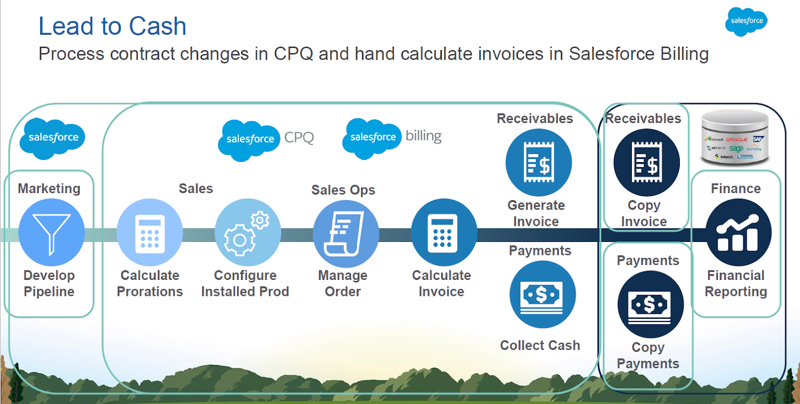
- Solving Common Business Challenges with Lead-to-Cash
Implementing Salesforce Billing for lead-to-cash allows you to solve several common business challenges. (Salesforce Billing Managed Package) - Key Lead-to-Cash Billing Functions
Salesforce Billing provides the capability for important lead-to-invoice functions. (Salesforce Billing Managed Package) - ERP Integration Architectural Considerations for Lead to Cash
When you evaluate Salesforce Billing as part of a lead-to-cash solution, consider the other systems necessary to perform billing functions such as payments and revenue recognition reporting. You’ll also need to define the scope in which you use Salesforce Billing to integrate with an ERP. (Salesforce Billing Managed Package)
