When you implement Salesforce Billing, consider the differences between Salesforce and
an ERP within the lead to invoice approach. These differences will help you identify whether
lead-to-invoice is the correct deployment option and strategy for your Salesforce Billing
implementation. (Salesforce Billing Managed Package)
Required Editions
Available in: All Salesforce Billing Editions
The Salesforce platform enables companies to drive internal technologies with the best interest
of customers in mind. Salesforce Billing embodies this purpose by completing the end-to-end
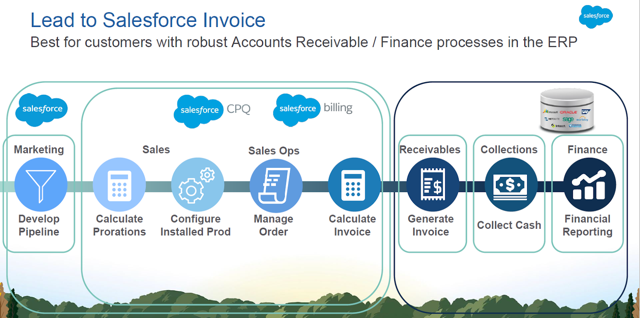
processes of the customer engagement lifecycle. The platform starts with a lead, which is priced
through Salesforce CPQ and intersects with Salesforce Billing during the transition from order to
invoice. This architecture allows Salesforce CPQ and Billing to function as a single system and
product catalog for carrying customer data from lead to invoice. Keeping your data in a single
system results in a cleaner handoff to an ERP for receivables, collections, and financial
reporting.
ERP Integration Architectural Considerations for Lead to Invoice When you evaluate Salesforce Billing as part of a lead-to-invoice solution, consider the other systems necessary to perform billing functions such as payments and revenue recognition reporting. You’ll also need to define the scope in which you use Salesforce Billing to integrate with an ERP. (Salesforce Billing Managed Package)
Other Lead-to-Invoice Integration Considerations Look at other important factors to consider when implementing Salesforce Billing as a lead-to-invoice solution. (Salesforce Billing Managed Package)
Did this article solve your issue?
Let us know so we can improve!
Loading
Salesforce Help | Article
Cookie Consent Manager
General Information
Required Cookies
Functional Cookies
Advertising Cookies
General Information
We use three kinds of cookies on our websites: required, functional, and advertising. You can choose whether functional and advertising cookies apply. Click on the different cookie categories to find out more about each category and to change the default settings.
Privacy Statement
Required Cookies
Always Active
Required cookies are necessary for basic website functionality. Some examples include: session cookies needed to transmit the website, authentication cookies, and security cookies.
Functional Cookies
Functional cookies enhance functions, performance, and services on the website. Some examples include: cookies used to analyze site traffic, cookies used for market research, and cookies used to display advertising that is not directed to a particular individual.
Advertising Cookies
Advertising cookies track activity across websites in order to understand a viewer’s interests, and direct them specific marketing. Some examples include: cookies used for remarketing, or interest-based advertising.