
You are here:
Get Started With Payment Gateways
Payment gateways are external platforms that act as a bridge for communications between Salesforce Billing and customer banks during the payment transaction process. Your developers configured the API to help Salesforce Billing send customer payment information to the gateway. They also configured API that lets Salesforce Billing record the results of the gateway-bank communication into Salesforce Billing objects. Although you won’t be working directly with the API, we recommend reviewing the general gateway communication process to understand the resulting record changes in Salesforce Billing. (Salesforce Billing Managed Package)
Salesforce Billing contacts a payment gateway in these scenarios.
- An electronic payment run picked up at least one eligible invoice.
- A user submitted a payment in the Payment Center.
At these stages, Salesforce Billing evaluates the customer account’s payment method for the Payment Gateway field. The field contains a lookup to the Salesforce Billing payment gateway object. The payment gateway object doesn’t perform any direct communication with the customer bank, and it doesn’t store or handle any customer payment data. That’s the external payment gateway’s job. Instead, it simply tells Salesforce Billing which external gateway to contact and passes any configuration data that the external gateway needs for communicating with Salesforce Billing.
Salesforce Billing also supports payment gateway integration packages that provide additional fields and processes for establishing communications with the external payment gateway. For example, if an account uses AuthorizeDotNet, your developers likely installed an AuthorizeDotNet integration package alongside some custom automation and processes. Don’t worry about these integration packages, either. We’ll look at the handful of gateway-specific fields you see later.
Let’s look at an overview of the payment gateway communication process. This flowchart picks up the payment process at the point where Salesforce Billing initiates communication with the external payment gateway, so it’s the same regardless of whether the request came following a payment run or payment center request. In this example, the customer is using AuthorizeDotNet to handle payments. Remember that during payment runs, Salesforce Billing creates the transaction before the gateway request, but during Payment Center applications, Salesforce Billing creates the transaction following the gateway’s response.
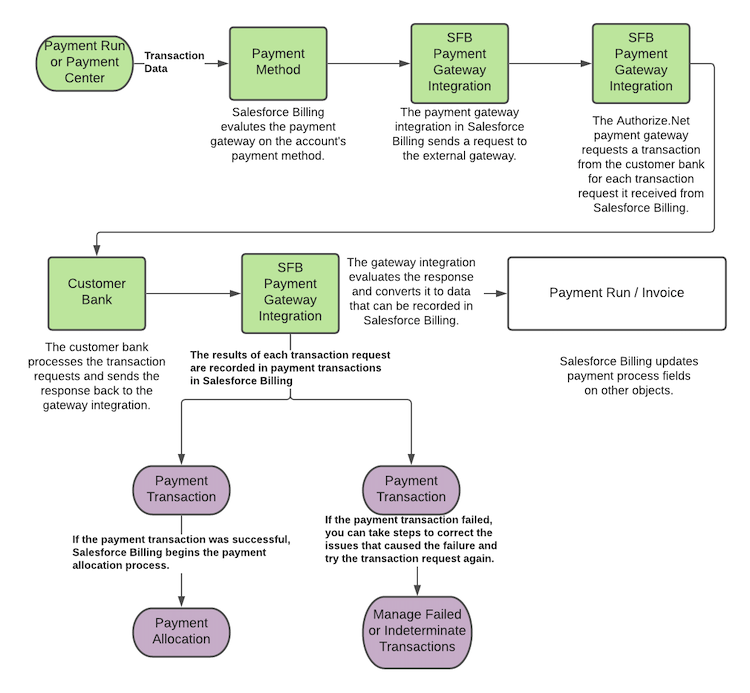
While your developers maintain the payment gateway integration, you’re responsible for ensuring that funds are allocated correctly following a successful transaction and for taking corrective steps following a failed indeterminate transaction.

