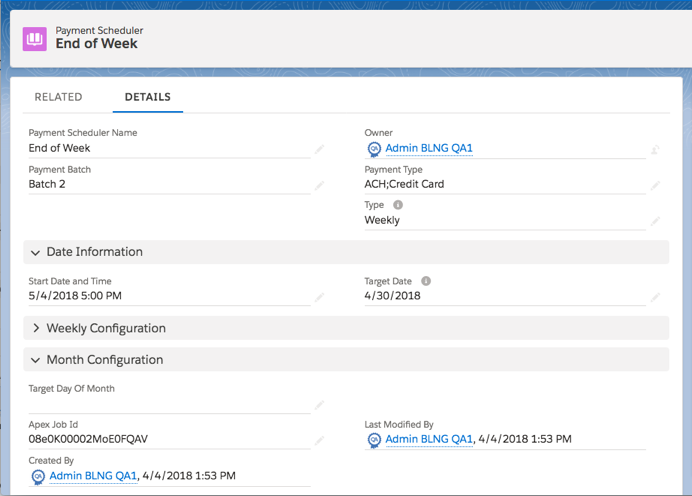
Payment scheduler fields control when the scheduler sends out a payment run and whether
that run happens on a recurring basis. You can also control the type of payment method that the
run uses when creating payments against an account’s invoices. (Salesforce Billing Managed Package)
Required Editions
Available in: All Salesforce Billing Editions
Include All Currencies
In multicurrency orgs, the payment run picks up invoices of all currencies. Salesforce
Billing still evaluates other criteria such as payment batch and payment type.
Payment Batch
If a payment scheduler has a payment batch value, the payment run evaluates only invoices
with matching payment batch values. This is an optional field.
Payment Type
Salesforce Billing includes an account in the payment run if the account contains a
payment method where the Auto Pay field is selected and the Payment Type value matches the
scheduler’s payment type. You can also choose multiple values for the scheduler’s payment
type. In this case, Salesforce Billing evaluates payment methods for the first value listed
in the scheduler’s payment type. If that method type isn’t available, it evaluates payment
methods for the other value.
Start Date and Time
Defines when your invoice scheduler begins its first payment run. Payment schedulers
require this field to start their first payment run, regardless of type. If you don’t provide
a value for this field, your payment scheduler doesn’t send out its first payment run.
Target Date
When a payment run evaluates invoices for payment, it includes invoices only if their
invoice date or invoice due date is on or before the scheduler’s target date. You can choose
whether the scheduler evaluates invoice date or invoice due date in Salesforce Billing
package settings.
Target Day of Month
Sets the day of the month for monthly payment runs. Use this field if your invoice
scheduler’s Type field has a value of Monthly.
Target Day of Week
Sets the day of the week for weekly invoice runs. The day is represented by a number,
where 1 equals Sunday. Use this field if your invoice scheduler’s Type field has a value of
Weekly.
Type
Defines whether the invoice run occurs once, daily, weekly, or monthly. This is a required
field.
Example This payment scheduler sends out a payment run every Friday at 5:00 P.M. starting the
first Friday of March. It picks up invoices with due dates on or before April 30, 2018.
Did this article solve your issue?
Let us know so we can improve!
Loading
Salesforce Help | Article
Cookie Consent Manager
General Information
Required Cookies
Functional Cookies
Advertising Cookies
General Information
We use three kinds of cookies on our websites: required, functional, and advertising. You can choose whether functional and advertising cookies apply. Click on the different cookie categories to find out more about each category and to change the default settings.
Privacy Statement
Required Cookies
Always Active
Required cookies are necessary for basic website functionality. Some examples include: session cookies needed to transmit the website, authentication cookies, and security cookies.
Functional Cookies
Functional cookies enhance functions, performance, and services on the website. Some examples include: cookies used to analyze site traffic, cookies used for market research, and cookies used to display advertising that is not directed to a particular individual.
Advertising Cookies
Advertising cookies track activity across websites in order to understand a viewer’s interests, and direct them specific marketing. Some examples include: cookies used for remarketing, or interest-based advertising.