
You are here:
Usage Rating and Processing
Usage products are billed based on a consumed amount of service, such as an electricity bill. Vendors will not know how much of the service was used, and therefore how much to bill the customer, until the usage period has elapsed. Salesforce Billing helps you organize usage-based products and invoice them based on the total amount of usage. (Salesforce Billing Managed Package)
Required Editions
| Available in: Salesforce Billing Summer ’17 and later |
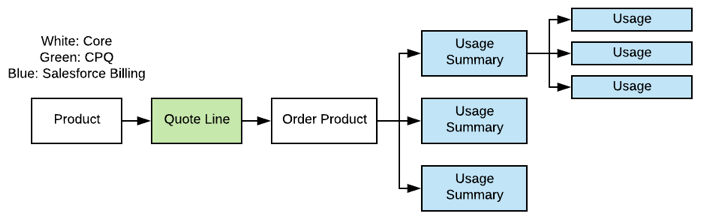
Usage products are represented by order products with a Charge Type field of Usage. Admins first define charge type on the product record, which passes its charge type first to the quote line and then to the order product.
Usage products are typically billed in arrears, since vendors have to gather usage data before actually billing. However, there are several other use cases associated with usage products. Usually, vendors bill usage products repeatedly over time, with each finance period containing its own tracked usage data.
Quoted usage is effectively an estimate, so it affects bookings value. The actual invoice amount may differ from the quote estimate.

Key Usage Billing Definitions
- Usage Records
-
Salesforce Billing uses two objects to manage usage-based invoicing. The usage object represents the amount of service consumed over a period of time. For example, a company sells a cell phone data plan that charges by the megabyte. A user streams 20 megabytes of data while commuting each weekday between 5:00 and 5:30 P.M., which is logged as a usage record. Over the course of a week, their account ends up with five unique usage records.
Usage summaries act as grouping objects for usage records, summarizing individual usage quantities into a total quantity that vendors can use for invoicing. If our cell phone user’s vendor wants to bill monthly, they could use a usage summary record that totals the quantities from all 20 usage records that user created over the month.
- Usage Aggregation
- Usage aggregation refers to the process of evaluating usage data recorded over a predefined period of time, then grouping it by a variable. Third parties usually handle this process.
- Usage Mediation
- Usage mediation refers to the process of organizing aggregated data and storing it for reference. Salesforce Billing handles usage mediation.
- Usage Rating
- Once usage data has been aggregated and mediated, the usage rating process determines the price per unit for each instance of usage.
Matching ID
A usage and a usage summary contain a lookup relationship. However, both records must have identical Matching ID fields for the usage to count toward the usage summary. Salesforce Billing also uses Matching IDs when amending usage order products. An amendment quote results in a separate order with its own order product, which in turn results in a separate usage summary and usage records. Since the new usage and summary records all have the same Matching ID, Salesforce Billing can tie them back to the original usage summary.
Users have to enter matching IDs for all of their usage summaries. You can use any value for the matching ID. We recommend using a process builder to quickly assign matching IDs to large groups of usage summaries at once.
Currently Supported Use Cases
- Post-Paid: Collecting usage and invoicing in arrears for the actuals
Usage Billing Overview
Usage summaries have predefined date ranges for counting usage records. For example, a usage summary for January would have a summary start date of 01/01/2018 and a summary end date of 01/31/2018. When you create an order, Salesforce Billing generates usage summaries for your usage order products based on the order product’s billing day of month, billing frequency, start date, and end date. A usage order product billed monthly with a start date of 01/01/2018 and end date of 12/31/2018 would have 12 usage summaries, each the length of each month in the year.
Salesforce Billing includes usage order products in an invoice if the usage summary’s next billing date ends before the order product’s next invoice target date. That way, all usage summaries that end before the invoice target date are included in the invoice.
- Ordering Subscription Products with Consumption Schedules
When you order a subscription product related to a consumption schedule, Salesforce CPQ creates an order product consumption schedule with the same field values and rates as the usage product's product consumption schedule. Access your order product consumption schedule through its related list on a subscription order product. Salesforce Billing also creates usage summaries for your order product based on the order product consumption schedule's billing term. The number and length of your usage summaries varies based on whether your order product came from a standard or evergreen subscription. (Salesforce Billing Managed Package) - Standard Usage Summaries
A usage summary is an object that groups usage records for an order product. As you load usage into your org, Salesforce Billing associates the usage records with the summary based on matching IDs. When you invoice your usage order product, Salesforce Billing prices the resulting invoice line based on the sum of usage subtotals across your entire usage summary. (Salesforce Billing Managed Package) - Custom Usage Summaries
It’s possible to create custom usage summaries and associate them to order products derived from products configured with charge type Usage (legacy usage product) or with charge type Recurring plus one or more related consumption schedules (usage based pricing, or UBP). (Salesforce Billing Managed Package) - Usage Rating
Once usage data has been aggregated and mediated, the usage rating process determines the price per unit for each instance of usage. (Salesforce Billing Managed Package) - Manage Matching IDs
A usage record and a usage summary contain a lookup relationship. However, both records must have identical Matching ID fields for the usage to count toward the usage summary. (Salesforce Billing Managed Package) - Billing for Amended Usage Summaries
When you amend a usage product and order the amendment quote, Salesforce Billing updates your usage summaries to reflect cancelations or new usage periods. (Salesforce Billing Managed Package) - Usage Summary and Usage Fields
A usage summary shows the total quantity and value of related usages, and the date ranges for including usage records. The usage record shows the number of usage charges over a predefined time period. A user can override the precalculated usage amounts with their own values. With certain page layout and field-level security settings, some fields aren’t visible or editable. (Salesforce Billing Managed Package)
