
You are here:
Einstein Conversation Insights
Give sales teams insights about their customer calls and surface coachable moments. Managers and reps can play recordings of conversations to gain visibility into mentions of competitors, products, custom keywords, pricing discussions, and next steps. Sales leaders can extract conversation trends and visualize insights related to voice and video calls.
Required Editions
| Available in: Lightning Experience |
| Available in Einstein Conversation Insights, which is available in Starter, Pro, Enterprise, Performance, Unlimited, and Agentforce 1 Sales Editions |

Einstein Conversation Insights (ECI) is a feature available for sales users that offers the ability to see insights and trends surfaced from voice and video calls. Calls are recorded and analyzed for mentions of specific keywords, phrases, and points of interest.
ECI offers a comprehensive view of sales teams’ conversation data. The Hub tab shows relevant metrics, recent conversations to take on next steps, and top signals if you’re using Sales Signals.
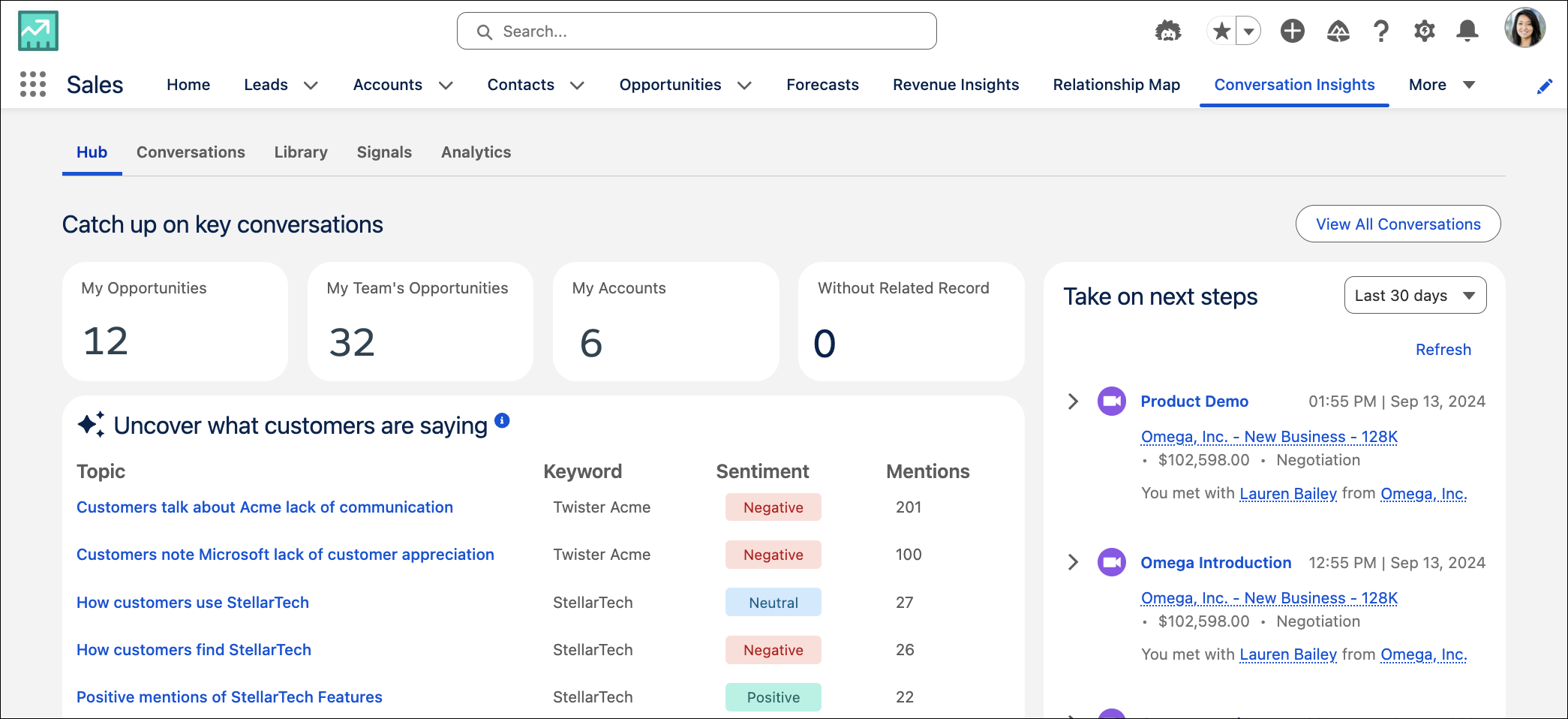
Your Conversation Hub shows relevant metrics about the conversation data for sales managers and their teams. The metrics include conversations related to:
- My Opportunities: The number of opportunities related to conversations where you are the owner.
- My Team's Opportunities: The number of opportunities related to conversations where your team members are owners.
- My Accounts: The number of accounts related to conversations where you are the owner or on the account team.
- Without Related Record: The number of calls where no related record is assigned where you are the owner.
If you have Sales Signals enabled, a list of the top signals is shown. Users can also access a list of recent conversations on the right. ECI users can access call details directly from the Hub tab, including transcripts, insights, action items, and call summaries, if your org is using the feature.
The Conversations tab allows users to filter and view relevant conversations. Sales users can filter by conversation owner, type, call date, related record, or other criteria.
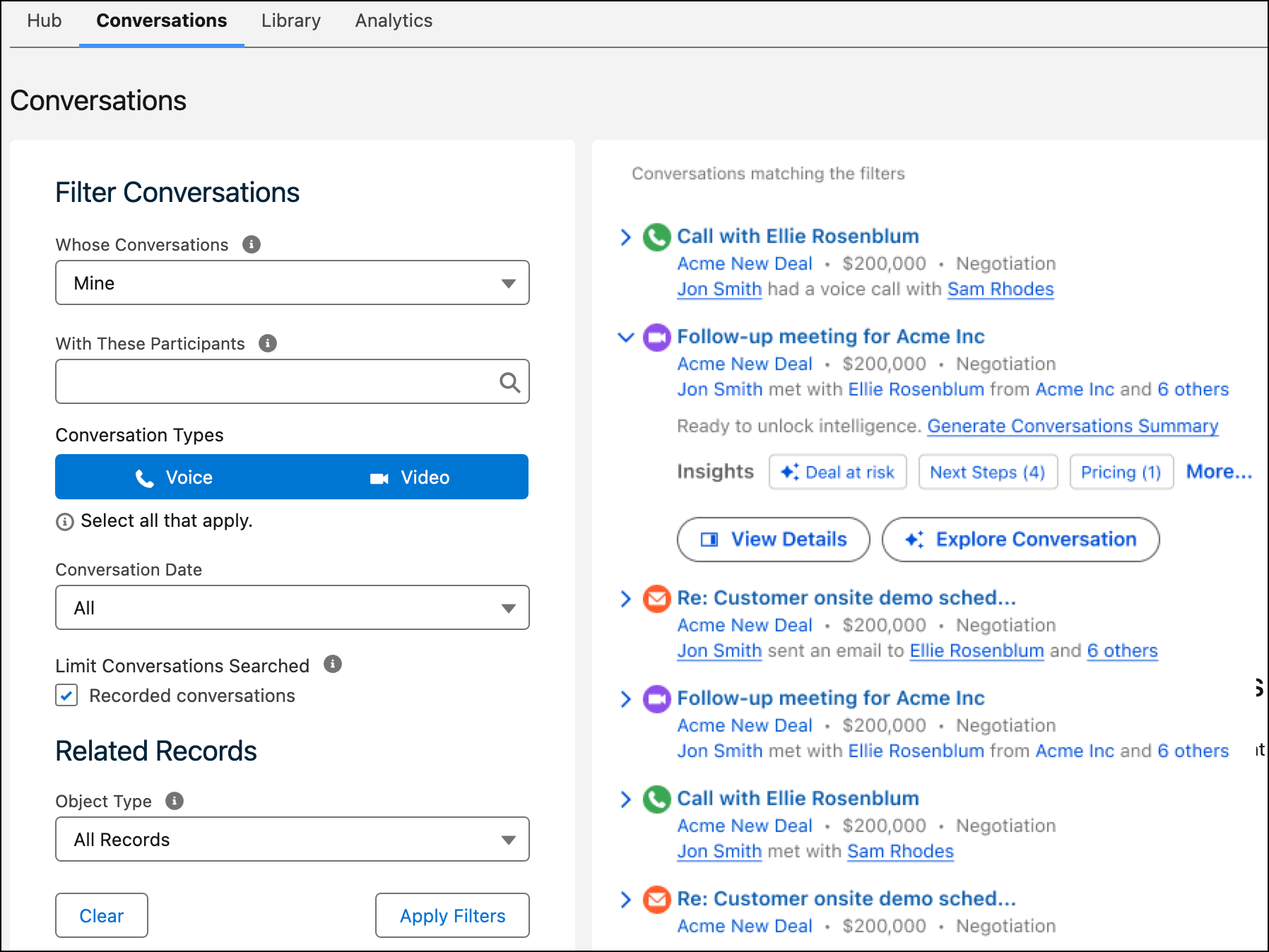
Under the Whose Conversations filter, the My Teams option displays records based on role hierarchy. The call records with owners who are under the context user’s role hierarchy are displayed.
Reps and managers can dig into conversation details from voice and video call records. This includes reviewing the call transcript, or seeing areas that need attention or follow-ups for a specific call from the Action Items tab.
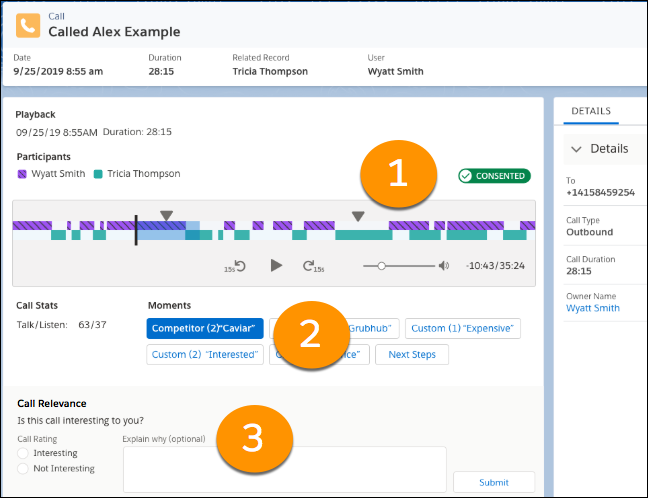
From voice and video call records, managers can also play call recordings and see call details, including the talk-to-listen ratio. The different colors show the participants on the call. Jump to different mentions in the call from the player (1). Click different mentions (2) to highlight and jump to specific areas of the call.
Managers can also add feedback (3) to help us surface the most relevant calls in the daily highlights email. This feedback goes to our system, not the sales or service rep on the call.
Managers can also see reports and dashboards about different insights.
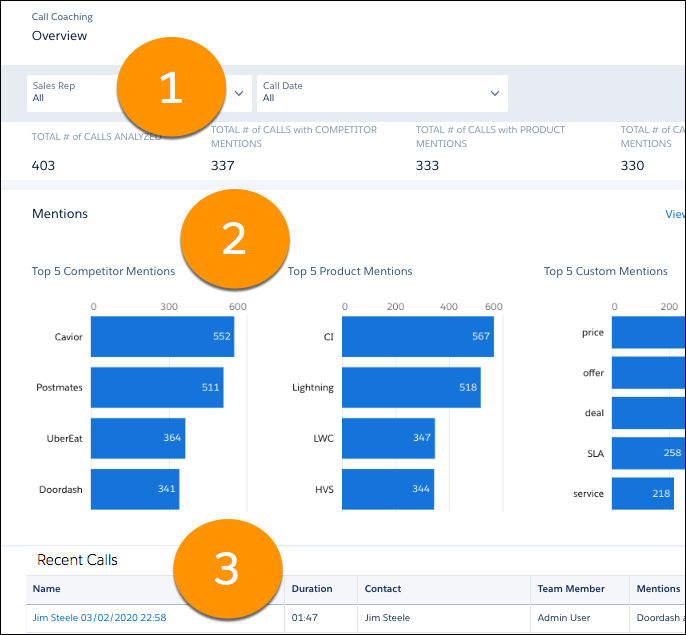
From the Overview page, managers can filter by rep and call date (1), and review reports of top mentions based on role hierarchy (2).
The Overview page also features links to recordings in the Recent Calls table (3). These recordings are the calls most recently made by your team.
Managers can see more details on the Mentions page.
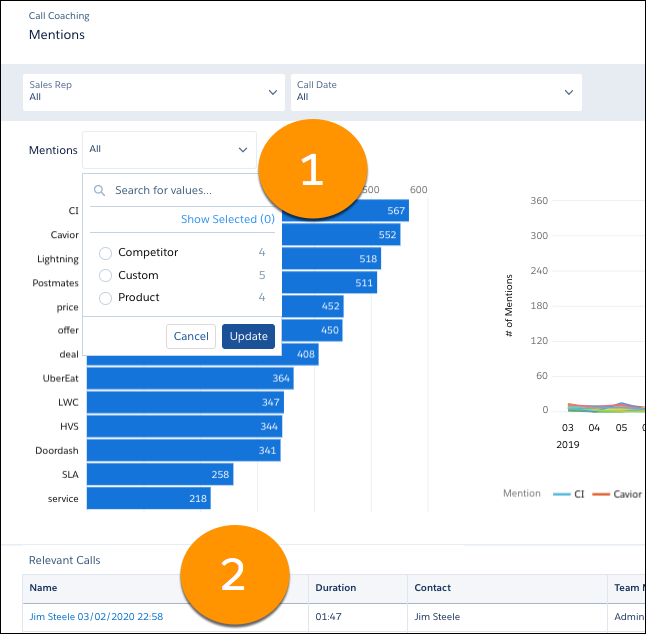
Filter by the type of mention and see relevant reports (1). This page also features a list of Relevant Calls (2) based on your filter criteria.
Einstein Conversation Insights comes with a number of automatic insights for sales and service users. Although Einstein Conversation Insights can be used with Service Cloud, Einstein Conversation Insights is optimized for sales conversations and many features are limited to sales use cases.
Automatic insights aren't configurable, and machine learning is used to automatically find these insights. To surface insights tailored to an org's needs, admins can create custom insights.
| Insight Type | Description |
|---|---|
| Next Steps | Follow-up, scheduling, and action items mentioned in calls |
| Pricing Mentioned | Quotes, cost, payment, and purchase orders mentioned in calls |
| Challenges | Issues such as time, additional approval, or other challenge-related phrases |
| Trending | Recent words or phrases that appear in a significant pattern across calls |
| Longest Monologue | The longest employee talk time relative to the call |
| Longest Customer Story | Customer’s longest turn speaking in a call |
| Question | Questions asked during calls |
| Objection - Budget | Objection related to price |
| Objection - Authority | Objection calling for input from someone else |
| Objection - Need | Objection related to a lack of interest or need |
| Objection - Timing | Objection indicating that the timing isn’t right |
| Insight Type | Description |
|---|---|
| Trending | Recent words or phrases that appear in a significant pattern across calls |
| Escalation | Request to talk to a supervisor made in calls |
| Attrition Risk | Service cancellation, unsubscription, or refunds mentioned in calls |
| Payments | Pricing, quotes, delivery fees, or invoicing mentioned in calls |
| Longest Monologue | The longest employee talk time relative to the call |
| Longest Customer Story | Customer’s longest turn speaking in a call |
| Question | Questions asked during calls |
Einstein Conversation Insights users can also receive daily emails with a list of highlighted calls if there were at least 3 calls with insights in the previous day.
Einstein Conversation Insights users can upload video calls that were recorded on a third-party platform. Get insights to meetings that were missed or meetings that are owned by the customer and shared later. Each user can upload up to three MP4 video recordings in a day.
- Recording Providers
Connect voice and video recording providers to begin importing calls into Einstein Conversation Insights. - Optimal Speaker Separation
Optimal Speaker Separation helps with the creation of transcripts and call insights, so we recommend that orgs enable the feature to get the most out of Einstein Conversation Insights. - Call Summaries and Generative Conversation Insights Powered by Einstein Generative AI
Einstein Conversation Insights (ECI) users can access generative call summaries and generative insights on voice and video calls. Powered by Einstein, the Summary tab on call records allows users to get automatic summaries that include next steps and customer feedback, and share summaries for easier team collaborations in the flow of work. All calls processed by Einstein Conversation Insights can also include generative conversation insights, leveraging an LLM to detect insights based on custom instructions and topics using natural language. Once the feature is on, a call summary and any generative insights configured will automatically be processed for all ECI calls. - Call Explorer Powered by Einstein Generative AI
Einstein Conversation Insights users can ask questions directly from voice and video call records. Powered by Einstein, the new Call Explorer allows users to quickly gather information about a call, such as product mentions or outstanding customer questions. - Sales Signals Powered by Einstein Generative AI
Einstein Conversation Insights users can see the topics that matter most to customers. Users can filter topics by category and keyword to see a dashboard of relevant signals and conversations. These conversations are based on products or competitors you identified while setting up ECI. Drill into each topic for more details, so that you and your team can identify any obstacles or opportunities. - Deal Recap Powered by Einstein Generative AI
Summarize the history of closed opportunities, helping your team understand why a deal was won or lost with Deal Recap. - Einstein Conversation Insights Related Record Matching
Einstein Conversation Insights (ECI) can match related records to voice and video calls automatically. This includes matching call records with related opportunities or accounts, and matching call participants with the right user, contact, or lead. These record connections are important for associating sales calls with corresponding deals, and ensuring that vital details remain accessible and context-specific. - Vendor Transcript Processing
With Vendor Transcript Processing, your sales teams can quickly access call summaries and critical call insights for their video calls. Sales managers can quickly deliver coaching tips to their reps and see how they’re doing. Existing ECI customers can toggle the feature on. New customers have it auto-enabled and can’t turn it off. - In-Person Meeting Transcription
Use the Salesforce mobile app to capture face-to-face meeting information and transform it into actionable CRM data. With In-Person Meetings enabled, you can capture AI-powered transcripts and get insights and recommendations from Einstein Conversation Insights. - Power AI Workflows for Einstein Conversation Insights with Invocable Actions
Use different invocable actions to get more out of your customer conversations. Harness these conversations to create sales agents, or draft sales emails and personalized pitches with a single click. For Einstein Conversation Insights, the available actions include Explore Conversation, Get Conversation Transcript, and Get Conversation Intelligence. - Set Up Einstein Conversation Insights
Use the Setup menu to get the guidance you need for setting up Einstein Conversation Insights. Connect a recording provider, assign permission sets, and define insights to use Einstein Conversation Insights. After the setup process is complete on the org and user levels, calls are processed automatically, and call data can be found on voice and video record pages. - Integrate Voice Connectors with Einstein Conversation Insights
If your sales or service teams are using Dialpad, RingCentral, Aircall, or Amazon Connect, you can connect their customer conversations with Einstein Conversation Insights (ECI) to get transcripts, insights, next steps, and more ECI features.
