
You are here:
Campaign Influence 1.0
Campaign Influence 1.0 helps identify the return on your campaign investments. It uses the Campaign Influence object to make connections across contacts, campaigns, and opportunities. Campaign Influence 1.0 isn’t supported in Lightning Experience. To track influential campaigns in Lightning Experience, switch to Customizable Campaign Influence.
Required Editions
| Available in: Salesforce Classic |
| Available in: Salesforce Professional, Enterprise, Performance, Unlimited, and Developer Editions |

Search Setup for campaign influence, and check the available pages. If the Model Settings page appears, you’re using Customizable Campaign Influence.
Primary Campaign Source
Only one campaign in a related list can be marked as the primary campaign source, because it allocates 100% of the attribution to the selected campaign. When you mark a campaign as primary, it’s added to the Primary Campaign Source field on the opportunity. For more flexibility, check out Customizable Campaign Influence.
Opportunity statistics, such as Opportunities in Campaign and Won or Closed values, appear only on the campaign marked as the primary source. Opportunity statistics don’t appear on other influential campaign records.
Before you select a primary source campaign, consider workflows or Apex rules that are triggered by changes to an opportunity record.
Auto-Association Settings
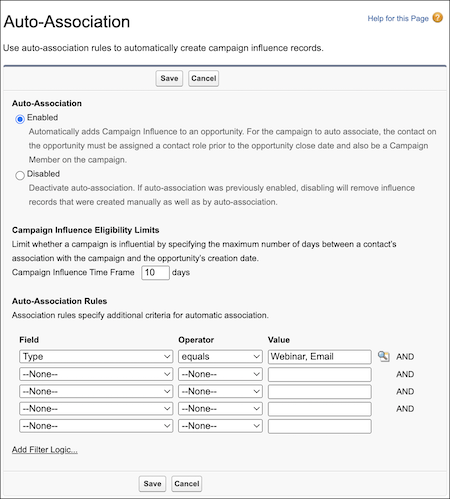
With Campaign Influence 1.0, you can choose whether to enable auto-association. When it’s turned on, influential campaigns are automatically added to an open opportunity record when a campaign’s related contact is assigned an opportunity contact role. You can also apply rules that specify which types of campaigns are considered influential.
- In the Campaign Influence Eligibility Limits section, the time frame field specifies a time period during which a campaign is considered influential. The time frame is the number of days between the date that a contact is added to a campaign and when a related opportunity is created.
- Eligibility limits work only when a contact is related to a campaign first and then assigned an opportunity contact role. Auto-association ignores contacts who are added to campaigns after the related opportunity is created.

If Parul doesn’t assign an opportunity contact role to Gerrie, the campaign isn’t added to the related list by auto-association. If Gerrie waits until June 26 to contact Sales, the campaign isn’t considered influential, so it isn’t added to the related list.
- Configure Campaign Influence
To enable Campaign Influence 1.0, add the Campaign Influence related list to Opportunity page layouts and decide whether to configure the optional auto-association settings. - Add Campaign Influence Manually
You can track campaign influence manually by adding it to the Campaign Influence related list. When you add to a campaign manually, you don’t select a specific contact, so names and campaign member statuses aren’t shown.
