
You are here:
Turn on Additional Features for Einstein Conversation Insights
Turn on opportunity matching and reporting features from Setup.
Required Editions
| Available in: Lightning Experience |
| Available in Einstein Conversation Insights, which is available in Starter, Pro, Enterprise, Performance, Unlimited, and Agentforce 1 Sales Editions |
| User Permissions Needed | |
|---|---|
| To enable Einstein Conversation Insights: | Customize Application |
These features aren’t required to use Einstein Conversation Insights. Turn them on if they’re appropriate for your business.
- From Setup, enter Einstein Conversation Insights in the Quick Find box, and then select General Settings.
- Turn on Optimal Speaker Separation to help with the creation of transcripts and call insights. Many ECI features rely on the availability of separate speaker tracks, so we recommend that all orgs enable the feature. After the feature is enabled, ECI users then receive individual banners prompting them to enable the feature.
- Turn on related record matching to automatically match related records to voice and video calls.
-
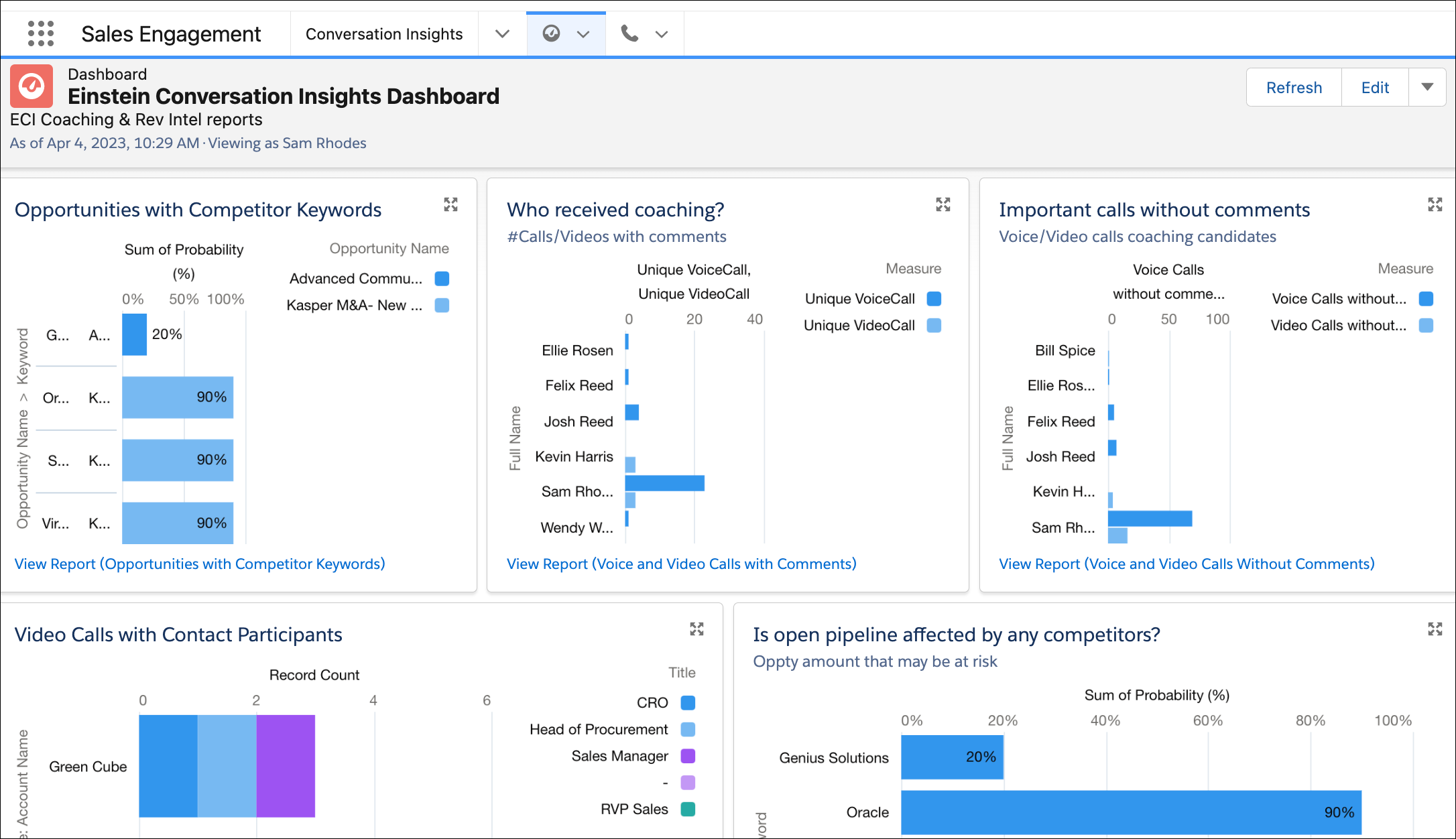
Turn on insights reports and conversation-related measures for enablement.
Starting in Summer ’25, Einstein Activity Capture (EAC) Activity 360 Reporting and Activity Metrics aren’t available in Einstein Conversation Insights (ECI) unless previously set up. If you’re already using data from Activity 360 Reporting and Activity Metrics in ECI, such as Unified Activity Insights and any related reports, you can continue to do so until these EAC reporting tools are retired. See Einstein Activity Capture Activity 360 Reporting, Activity Metrics, Activities Dashboard Upcoming Retirement.
This setting turns on reporting features for conversation insights measures. It also allows you to embed voice and video measures into Enablement programs. This setting isn’t currently available to orgs with over 10,000 users.Access out-of-the-box reports from the Einstein Conversation Insights Reports folder.
Einstein Conversation Insights Reports Report Name Description Avg Talk-to-Listen Ratio for Sales Rep Voice Calls with Rep's Talk to Listen Ratio Opportunities with Competitor Keywords Opportunities with Competitor mentions Opportunities with Voice Call Insights Team's Opportunities with voice calls with Insights Opportunities with Video Calls Insights Opportunities with Videos with Insights Deal Risks due to Objections Deal Risks due to Objections mentioned Video Calls with Contact Participants Video Calls with Contact Participants Voice and Video Calls with Comments Voice and Video Calls with Comments Voice and Video Calls Without Comments Calls without comments that are candidates for coaching Users can also access a related dashboard.
- Turn on the upload calls feature. Users must be authenticated with at least one of these vendors—Zoom, Microsoft Teams, or Google Meet—to use this feature.
- Set the frequency for call highlights emails. These may include coaching recommendations and call insights based on significant keywords. Emails are sent if there were at least 3 processed calls in the previous time period.
- Turn on Einstein for Sales features. These features require the Einstein for Sales add-on and some also require Data 360. From Setup, enter Einstein for Sales and follow the steps described.
