
You are here:
Set Up Automatic Contact Creation
Turn on Automatic Contact Creation and specify criteria for when contacts are created.
Required Editions
| Available in: Lightning Experience |
| Available with Einstein 1 Sales Edition |
| Available with Sales Cloud Einstein, which is available in Performance and Unlimited Editions and for an extra cost in Enterprise Edition |
| Available with Sales Engagement in Sales, which is included in Performance and Unlimited Editions and available for an extra cost in Professional and Enterprise Editions. Sales Engagement is also available for an extra cost in Service and Lightning Platform. |
| Available with Revenue Intelligence, which is available for an extra cost in Enterprise and Unlimited Editions |
| User Permissions Needed | |
|---|---|
| To enable or disable Automatic Contact Creation: | View Setup and Configurations AND Customize Application |
| To view the Autocreation Settings setup page: | View Setup and Configurations AND Customize Application |
If you haven’t already, enable Einstein Activity Capture.
- From Setup, in the Quick Find box, enter autocreation, and then select Contact Creation Automation.
- Turn on Automatic Contact Creation.
-
Set thresholds as to how many times a person receives an email from or meets with an
external person before a contact is created automatically. The email threshold also
controls when a contact appears in the Contact Suggestions tile on Seller Home.
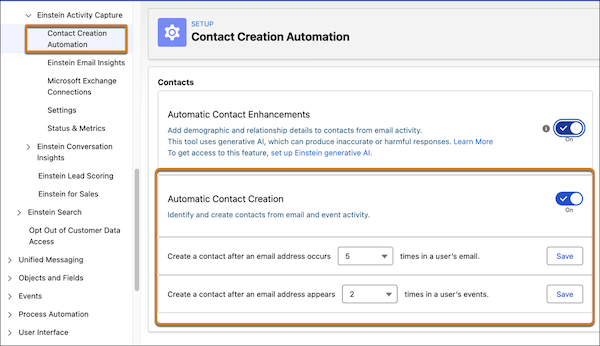
Separate threshold settings for email and events lets you consider the type of relationship and interaction before automatically creating a contact record. For example, set a higher threshold for emails (three or four interactions) and a lower threshold for events (one meeting) to prioritize capturing contacts who are actively building relationships and in conversation with sales reps.
After a contact is created
automatically, the ContactSource field on the Contact record is set to Auto
Create.
