You are here:
Amending Products with Consumption Schedule
When you amend a contract containing order products with consumption schedules and order the amendment quote, Salesforce Billing updates your usage summaries to reflect cancelations or new usage periods. (Salesforce CPQ Managed Package)
Required Editions
| Available in: Salesforce CPQ Spring ’19 and later |
By default, Salesforce CPQ supports only replacements and cancelations for amended products with consumption schedules. Other amendment functions, such as increasing the quantity of a product with a consumption schedule, must be managed by the partner. To cancel a product with a consumption schedule, reduce the product's quantity to zero. To replace a product with a consumption schedule, reduce the product's quantity to zero and then add another quote line for a different product with a consumption schedule

When you order your amended quote, Salesforce Billing performs the following actions based on the type of amendment you performed.
- If you replaced an order product for a new one, Salesforce Billing creates usage summaries for your remaining billing periods on the new order product. The matching IDs for these usage summaries must equal the matching ID on your replacement order product's order product consumption schedule. We recommend managing this process with automation such as a process builder.
- If you canceled your original order product, Salesforce Billing doesn't create more usage summaries for it.

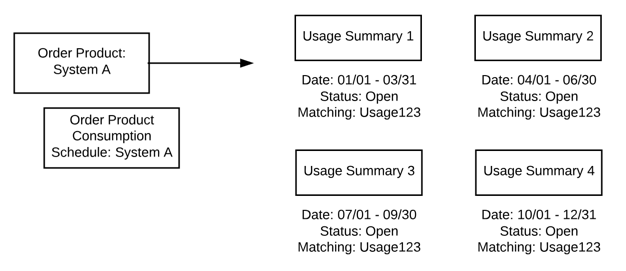
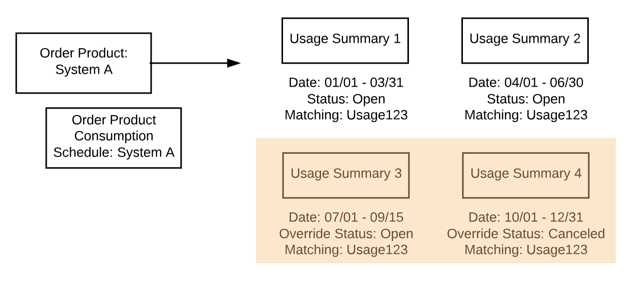
Your customer amends their contract on 09/15 and replaces the original system with a different version. After ordering your amendment quote, Salesforce CPQ updates the original order product's third and fourth usage summaries. The third usage summary changes its start and end date to match the partial period. Both usage summaries get a value for their Override Status fields; the third summary's stays open while the fourth summary's is closed.
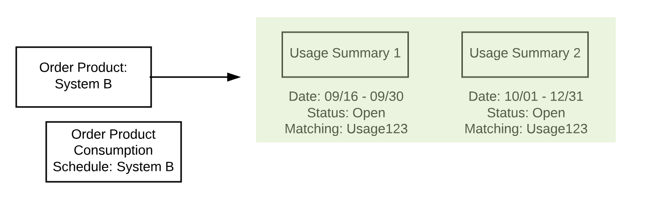
Salesforce CPQ then creates two more usage summaries for your new order product. The first new usage summary represents the period from the amendment through the end of the quarter. The second new usage summary represents the fourth quarter. As long as your usage and usage summaries have the proper matching values with the new consumption schedule, you can continue uploading and rating usage for your new system's order product.