
You are here:
Approval Chains
Use an approval chain to send an approval to several approvers simultaneously. When the approval process is completed, Advanced Approvals moves to the next step of approval rules. (Salesforce CPQ Managed Package)
Required Editions
| Available in: Salesforce CPQ Summer ‘16 and later with Advanced Approvals 3.1 and later |
An approval chain represents a series of approvals that must happen in a specific sequence. Each part of the chain represents an approval rule with a shared Approval Chain field value and an increasing Approval Step field value. For example, you can set up a chain that sends approvals through each management level of your finance team. When the accountant approves an approval, the finance manager receives an approval email. When the finance manager approves, the VP of finance receives an approval email. The request is not fully approved until the VP of Finance provides their approval.
- Approval Rule 1
- Approval Chain: 1
- Approval Step: 1
- Approver: Accountant
- Approval Rule 2
- Approval Chain: 1
- Approval Step: 2
- Approver: Finance Manager
- Approval Rule 3
- Approval Chain: 1
- Approval Step: 3
- Approver: VP of Finance
You can also run several approval chains simultaneously. All chains are initiated when an approval is requested, even if they begin on different steps. After it’s initiated, a chain moves through its steps independent of other chains. This way, higher levels of the approval process don’t get bottlenecked if one approver takes a long time to respond. After all chains complete their final approval steps, the approval process is completed and the record is approved.
Let’s look at a complex approval process with several chains.
If a quote has a net total greater than $1,000,000, the sales rep must receive approval from all five of your company’s managed service teams.
We’ve outlined this approval path in the following diagram. As soon as the approval is requested, the first approver in each chain receives the approval request. After they approve, the approval request moves to the next approver in the chain. Each box represents a unique approval rule, where the text inside matches the rule’s approver. The columns represent each rule’s Approval Chain field, while the rows represent each rule’s Approval Step.
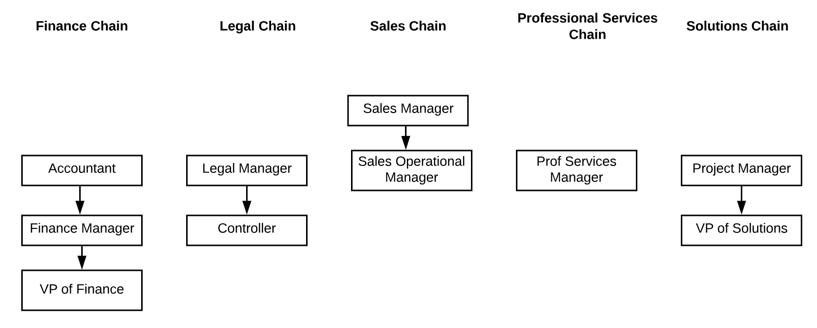
Remember, all chains must approve the request before the record is approved. In this case, the VP of Finance is the last approver.
- Set Up Approval Chains
Add an approval chain to your approval rule. (Salesforce CPQ Managed Package)
