You are here:
Considerations for Custom Action Conditions
When you add conditions to your custom actions, consider these key guidelines. (Salesforce CPQ Managed Package)
Required Editions
| Available in: Salesforce CPQ Spring ’14 and later |
The Target Object field defines which fields are available to use in the conditions. Depending on where the custom action appears, you can choose either Product or Quote.
| Target Object | Use |
|---|---|
| Quote |
|
| Product |
|
After choosing the target object, use the field, operator, and filter value to define the logical statement that the condition evaluates. For example, your condition could evaluate whether the quote's total price is greater than $500,000, or whether a product contains "LAPTOP" in its product code.
After you create conditions, use the parent custom action’s Conditions Met field to specify whether the action must meet any or all of its conditions.


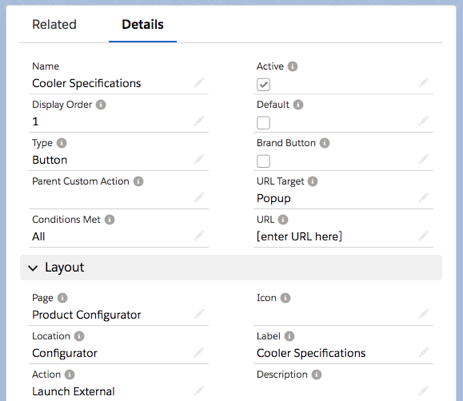
- Create a custom action that appears in the configurator and opens a page in a new
window. Because we're only introducing one condition, we can leave the Conditions Met
field to All.
- Set the Type to Button.
- Set the URL Target to Popup.
- Set the Page to Product Configurator.
- Set the Location to Configurator.
- Set the Action to Launch External.
- Add a label that describes your custom action, such as Cooler Specifications.
- Add your URL.
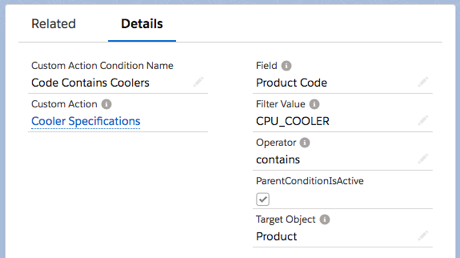
- Create your condition. Because all your company's coolers contain "CPQ_COOLER" in their
product codes, your condition must filter by that value.
- Set the Field to Product Code.
- Set the Filter Value to CPU_COOLER.
- Set the Operator to Contains.
- Set the Target Object to Product.
Next, create your condition. Because all your company’s coolers contain "CPQ_COOLER" in their product codes, your condition must filter by that value.