
You are here:
Custom Action Fields
Review these custom action fields, listed in alphabetical order. With certain page layouts and field-level security settings, some fields aren’t visible or editable. (Salesforce CPQ Managed Package)
Required Editions
| Available in: All Salesforce CPQ Editions |
Custom Action Fields
- Action
- The result of selecting the custom action.
- Action Name
- The name is used in your list of custom action records. It doesn’t appear on the button.
- Active
- Select this field to show the custom action on your target page.
- Brand Button
- Enable brand button styling on this custom action when it appears in the UI. Brand button styling is based on brand button settings in your org's active Theme.
- Conditions Met
- If your custom action uses conditions, choose whether the custom action must meet any or all its conditions.
- Default
- When enabled, for custom actions with a search filter, show the Product Selection page with a filtered product list first when users open the quote line editor. This field doesn’t work for other types of custom actions.
- Description
- Describes what the custom action does.
- Display Order
- The order in which custom actions appear on a page is based on the display order. Custom actions with lowest display order appear first, from left to right.
- Event Handler Name
- This field is for Salesforce internal use only. No need to add it to your page layout.
- Icon
- If your custom action is a button, you can make it appear as an icon image.
- Label
- The text that appears on your custom action in the UI. We've provided a collection of default labels, but you can also add your own as a new picklist value.
- Location
- The custom action appears in this area on your chosen page. This field's values vary based on the value of the Page field.
- Page
- Choose where the custom action appears. This field controls the available values in the Location and Action fields.
- Page Handler Name
- This field is for Salesforce internal use only. No need to add it to your page layout.
- Parent Custom Action
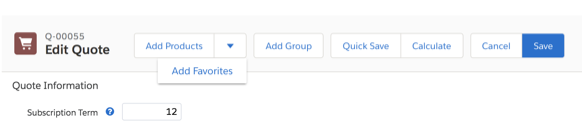
- A parent custom action groups one or more custom actions under a dropdown arrow. There’s no limit to the number of custom actions that look up to the same parent, but we recommend that your child custom actions don’t flow over your quote lines.
- For example, the Add Favorites custom action has the Add Products custom action as its
parent.
- Return Target
- Users return to this page instead of the quote detail page when they leave the quote line editor. This field works only for quote line editor custom actions that perform a Save or Cancel action.
- Return URL
- Enter a URL if you want Salesforce CPQ to return customers to the URL after the custom action's action has finished.
- Target Object
- If your custom action lets sales reps add a record to their quote, choose whether this custom action directs them to a selection page for products, assets, subscriptions, or favorites.
- We deprecated this field after Salesforce CPQ V25. Users on later versions should use the Page, Location, and Action fields to control the results of their custom action.
- Type
- Choose whether the custom action appears as a button, menu, or separator in the UI.
- URL
- When a user clicks the custom action, it takes them to the URL provided in this field. The
URL can be a link to an internal or external page, or a Salesforce CPQ field. URLs must start
with
http://orhttps://. For more information on setting up field parameters, check out Considerations for Linking to Custom Fields from Custom Actions. - URL Target
- If your custom action links to a URL, specify whether clicking the custom action replaces the current page or opens a new page in your sales rep’s browser.
Did this article solve your issue?
Let us know so we can improve!
