
You are here:
Pricing Guidance
Pricing guidance uses Salesforce Analytics to create recommended discounts based on historical pricing trends. You can then assign pricing guidance to your products. When a sales rep adds a product with pricing guidance to their quote, they can see the target, norm, and floor discount recommendations in the quote line editor. (Salesforce CPQ Managed Package)
Required Editions
| Available in: Salesforce CPQ+ Summer ’19 and later |
When sales reps add a product with pricing guidance to their quote, the quote line's
 icon
lets them open the Pricing Guidance detail page. The detail page shows discount values
based on historical guidance and pricing strategist revision. The target discount is
highlighted as the ideal discount, while the norm and floor discounts give the sales rep
context when choosing whether to accept the target discount.
icon
lets them open the Pricing Guidance detail page. The detail page shows discount values
based on historical guidance and pricing strategist revision. The target discount is
highlighted as the ideal discount, while the norm and floor discounts give the sales rep
context when choosing whether to accept the target discount.

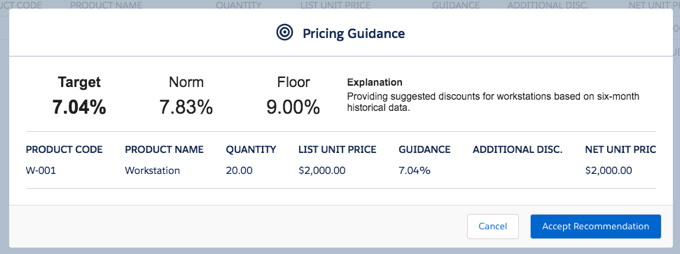
- Target
- The lowest ideal discount. This value maximizes the sale price for the sales rep while still providing customer purchase incentive through a discount.
- Norm
- A mid-range discount that represents a middle ground between the target and floor discounts. Many admins set the norm discount close to the median discount.
- Floor
- The highest recommended discount. This value represents a generous discount used only in special circumstances, such as a final incentive to close a deal or to prevent the attrition of a long-time customer.
If the sales rep clicks Accept Recommended Price, Salesforce CPQ applies the target discount in the Additional Discount field on their quote line. The sales rep manually enters the median or floor discounts. Based on your org's approval settings, discounts from pricing guidance may still require further approval.
- What Does Pricing Guidance Do?
Pricing guidance uses historical quote data to evaluate the total discounts of products on previous quotes and determine the median discount percentage for those products. Then, you can customize target, norm, and floor discounts as percentages relative to the median discount. You can define filters for the type of quotes and products included in the evaluation. When a sales rep adds a product with pricing guidance to their quote, then can apply the target discount and view the norm and floor discounts for additional context. You can create pricing guidance manually or use CRM Analytics for advanced quote analysis. (Salesforce CPQ Managed Package) - Set Up Pricing Guidance With CRM Analytics
Drive your sales team close deals by providing them with pricing guidance based on product pricing trends. Use CRM Analytics to create a pricing guidance record and apply it to one or more products. Edit the pricing guidance record for greater control over discount values and quantity ranges. (Salesforce CPQ Managed Package) - Create Pricing Guidance Manually
Users without CRM Analytics can create a pricing guidance record and define its discounts and tiers manually. (Salesforce CPQ Managed Package) - Things to Know About Pricing Guidance
Check out guidelines, considerations and useful tips for working with pricing guidance. Review pricing guidance field definitions and permissions. (Salesforce CPQ Managed Package) - Price Your Quote Lines with Pricing Guidance
The next time you're closing a deal, check out pricing guidance to view target discounts based on historical sales information. (Salesforce CPQ Managed Package)
