
You are here:
Review Your Prediction’s Scorecard
After your prediction is finished building, review its results in the Einstein Prediction Builder scorecard. Check out big-picture metrics, like prediction quality and top predictors. Drill in on details, such as impact, correlation, and weight of each predictor.
Overview Page
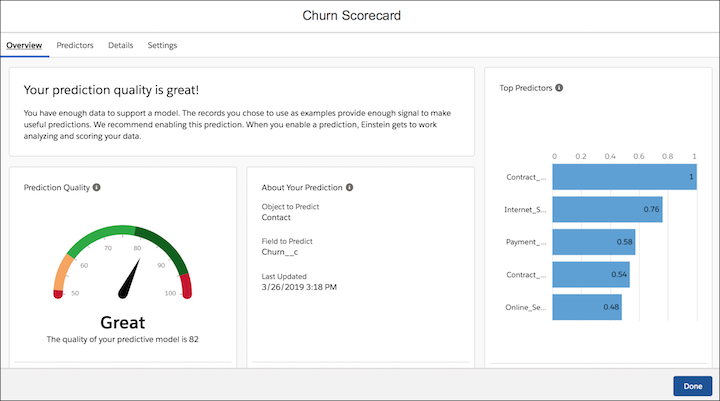
The Overview page shows the overall prediction quality, the top-five predictors in the model, and some basic information about your prediction. Depending on the prediction quality, you can decide how to use your prediction based on this information alone. If not, review the other pages in the scorecard to get a closer look.
The Last Updated status shows the date and time your predictive model looked at the example data that was used to build your prediction. Einstein retrains your model once a month, as long as the prediction is enabled.
Predictors Page
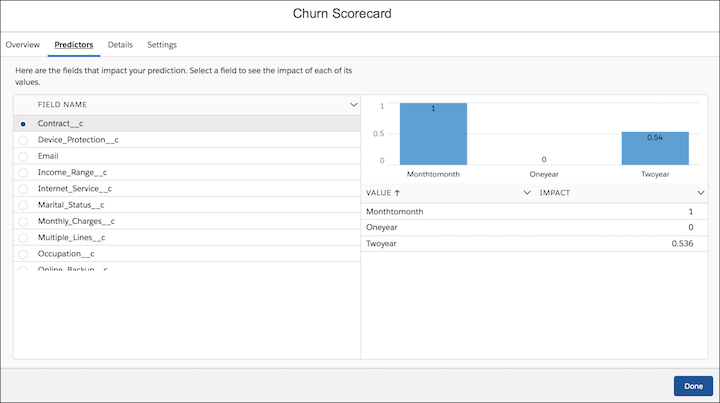
The Predictors page of the scorecard shows the impact of each predictor in your model. To see their impact, select a field included in your model.
Details Page
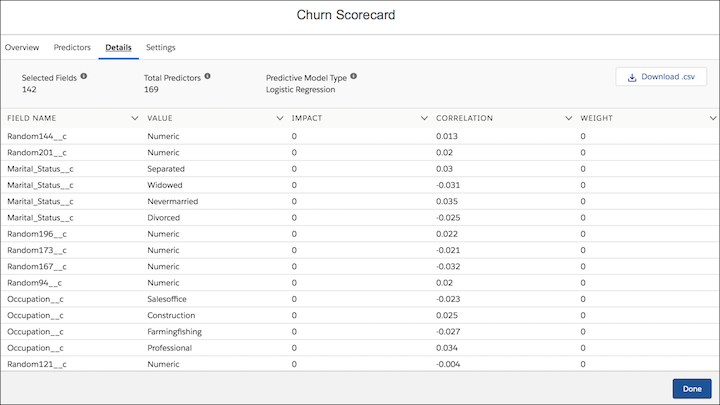
The Details page lists the fields that affect your prediction, with multiple metrics to indicate how meaningful they are. If your predictive model contains more than 100 predictors, it’s possible that you don’t see them all. The scorecard shows you the top 100 predictors ranked by impact, and the top 100 ranked by correlation. If your model has at least 100 predictors, the number displayed in the scorecard is likely to be from 100 through 200.
- Impact is a number from 0 through 1 that represents the scaled weight or importance of a predictor.
- Correlation is the relationship, positive or negative, between a predictor and the field being predicted.
- Importance and Weight indicate the significance of a predictor. Depending on the model type
used to build the prediction, either importance or weight is displayed, but not both.
 Note Data scientists know and care that importance is used when the model type is Random Forest, Decision Tree, Random Forest Regression, or Decision Tree Regression. Weight is used when the model type is Logistic Regression or Linear Regression.
Einstein determines which predictive model type to use based on the type of prediction problem. See Predictive Model Types for more information.
Settings Page
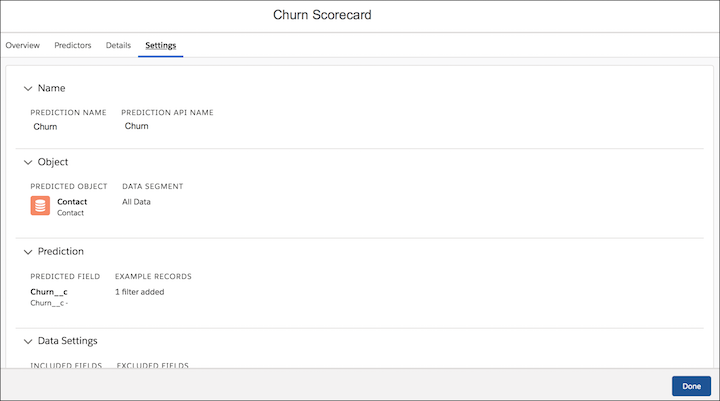
The Settings page summarizes everything selected when setting up the prediction. If you want to change anything, you can edit or clone your prediction and build again.
- Estimated Prediction Results
Sometimes prediction scorecards show Estimated in two places: the Prediction Quality and Distribution of Results. - Improve the Quality of Yes/No Predictions
When reviewing your prediction scorecard, you see a prediction score. If you’re not satisfied, here are some ways to improve the prediction quality. - Improve the Quality of Numeric Predictions (Beta)
When reviewing your prediction’s scorecard, you get a prediction quality score. If you’re not satisfied with the quality, here are some steps you can take to try to improve it. - Predictive Model Types
Your prediction’s scorecard shows the predictive model type that was used to build your prediction. Einstein Prediction Builder tests multiple predictive models and chooses the one that performs best based on your data. The models we test depend on the type of field that you’re predicting.
