
You are here:
Create a Managed Package with Recommendations
After you build custom recommendations using Einstein Recommendation Builder, you can add one or more of them to a managed package to make them reusable in other orgs.
Required Editions
| Available in: Developer Edition |
- Log in to a Developer Edition org that has Einstein Recommendation Builder enabled.
- Use Einstein Recommendation Builder to build one or more recommendations.
- From Setup, in the Quick Find box, enter package, and then select Package Manager.
- Next to Developer Settings, click Edit.
- On the Change Developer Settings page, click Continue.
- In the Namespace Prefix field, enter a unique name to identify your package and distinguish it from other developers’ packages.
- Click Review My Selections.
- Click Save.
- Next to Packages, click New.
- Enter a name for your package that describes what package subscribers can do with it, such as Pool Maintenance Parts. When the package is installed, this name is used in the Recommendations list view in Einstein Recommendation Builder.
- Enter a description to provide details about the package.
-
Select Managed, and click Save to
confirm.
 Note You can only package recommendations in a managed package.
 - Click Save to create the wrapper for your package. It doesn’t contain anything yet.
- In Package Manager, click the name of the package.
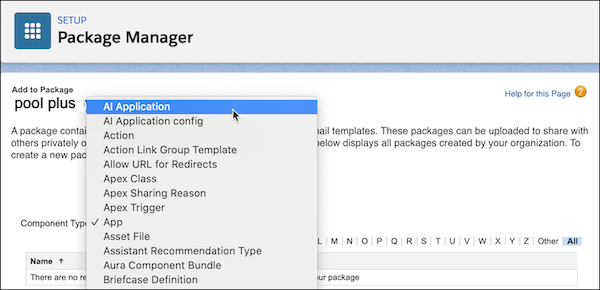
- On the Components tab, click Add.
-
From the Component Type menu, select AI
Application.
-
Select the
recommendations
you want to add to your package, and click Add to
Package.
Note The Components tab now lists the recommendations with the related components that are added for you.
- At the top of the page, click Upload.
- Enter a version name for the package. For example, enter something time-based such as Fall 2021.
- Enter a version number or leave the prefilled value.
-
Select Managed -
Released
Note This option generates a URL for deployment.
- If you want, apply other settings, such as password protection and package requirements.
- Click Upload, and click OK to confirm.
- In the Version Detail section, you can copy the installation URL and paste it somewhere to save for later. You also receive an email with this URL.
Did this article solve your issue?
Let us know so we can improve!
