
You are here:
Considerations for Setting Up Einstein Recommendation Builder
Before you start building recommendations, here are a few things to keep in mind.
Einstein Recommendation Builder generates recommendations based on data in Salesforce objects with the following relationships:
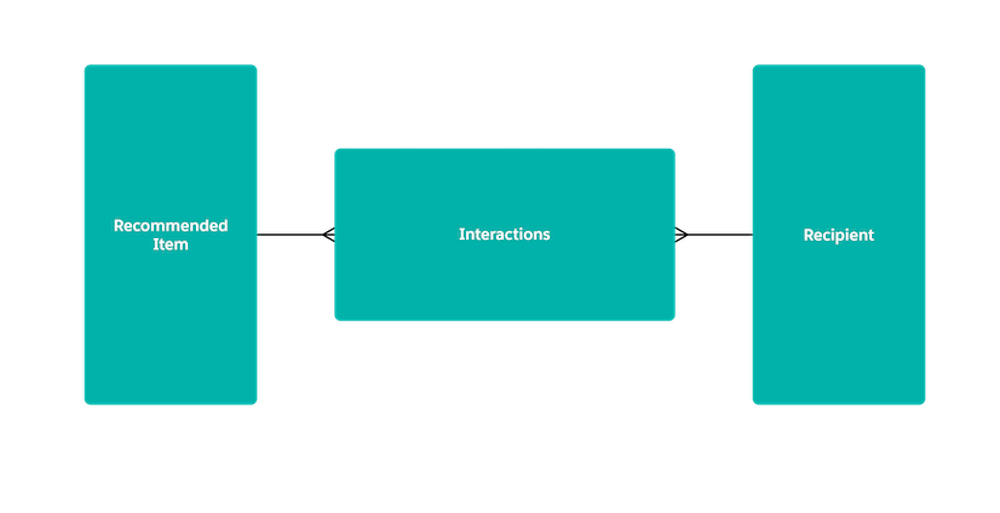
The Interactions object can have either Lookup or Master-Detail relationships with the Recipient and Recommended Items objects.

Supported Objects
Einstein Recommendation Builder works with all custom objects and supports the following standard objects.
- Account
- Asset
- Campaign
- Case
- CaseArticle
- Contact
- ContractLineItem
- Entitlement
- Lead
- LiveChatTranscript
- Opportunity
- Order
- OrderItem
- Product2
- ProductConsumed
- Quote
- QuoteLineItem
- ServiceContract
- WorkOrder
- WorkType
For examples, see Object Type Examples.

Limits
The Predictors tab on the recommendation scorecard shows a list of predictors for your recommendation. It shows impact information about each predictor. The scorecard shows you the top 100 predictors ranked by impact. If your recommendation has at least 100 predictors, the number displayed in the scorecard is likely to be between 100 and 200.
Make sure that your dataset has the minimum records to build a successful recommendation.
| Type of Dataset | Minimum Records | Maximum Records |
|---|---|---|
| Recipient Records | 100 | N/A |
| Recommended Items Records | 10 | 300,000 |
| Positive Interaction Examples | 400 | N/A |
If your recommendation objects have segments, Einstein checks to see if each segment has enough records.
Recommendations in Sandbox
Recommendations created in production aren't copied to sandbox orgs. To use a recommendation in sandbox, copy your licenses from production, and build a new recommendation. For best results, use a recently refreshed sandbox with the minimum count of required records on each object.
