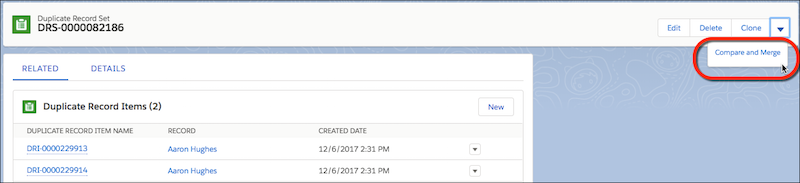
A duplicate record set is a list of items identified as duplicates. It’s created when
a duplicate rule or job runs. Let your Lightning Experience users merge duplicates by
granting them access to duplicate record sets.
Available in: Essentials, Professional,
Enterprise, Performance, Unlimited, and
Developer Editions
User
Permissions Needed
To view duplicate record sets and items:
View on accounts, contacts, or leads
To merge duplicate record items:
Edit and Delete on accounts, contacts, or leads
You can grant access to duplicate record sets and duplicate record items to users
with a Sales Cloud, Service Cloud, or Sales & Service Cloud license.
Duplicate record sets containing the results of duplicate jobs don’t include a link
to the job by default. To include the link, use Lightning App Builder to add the
Parent field to your duplicate record set layout.
View duplicate record sets.
In Lightning Experience, from the App Launcher, open
Duplicate Record Sets.
Note In list views,
duplicate record sets are displayed in Table view only.
In Salesforce Classic, click the Duplicate Record Sets tab.
To manage duplicates that aren’t surfaced by a duplicate rule, create a
duplicate record set.
On a duplicate record set list view, click
New.
Specify a duplicate rule (in the Duplicate Rule field) or a duplicate
job (in the Parent field).
In Lightning Experience, in the Related tab, click
New. In Salesforce Classic, on the duplicate
record set detail page, click New Duplicate Record
Item.
In Lightning Experience only, merge duplicates in a set by selecting the
Compare and Merge action.
To let users merge duplicates in sets, give them access to duplicate record
sets in Lightning Experience.
We use three kinds of cookies on our websites: required, functional, and advertising. You can choose whether functional and advertising cookies apply. Click on the different cookie categories to find out more about each category and to change the default settings.
Privacy Statement
Required Cookies
Always Active
Required cookies are necessary for basic website functionality. Some examples include: session cookies needed to transmit the website, authentication cookies, and security cookies.
Functional Cookies
Functional cookies enhance functions, performance, and services on the website. Some examples include: cookies used to analyze site traffic, cookies used for market research, and cookies used to display advertising that is not directed to a particular individual.
Advertising Cookies
Advertising cookies track activity across websites in order to understand a viewer’s interests, and direct them specific marketing. Some examples include: cookies used for remarketing, or interest-based advertising.