Macros make automating repetitive tasks possible so reps can focus less on busy work
and more on selling. We provide an example of a macro that, after the sales rep leaves a
voicemail for a lead, logs the call, sends an email to the lead, and creates a follow-up task
for the rep. Use this guide when you’re creating your own macro.
From a lead record, create a macro from the utility bar. Then fill in the details as
follows.
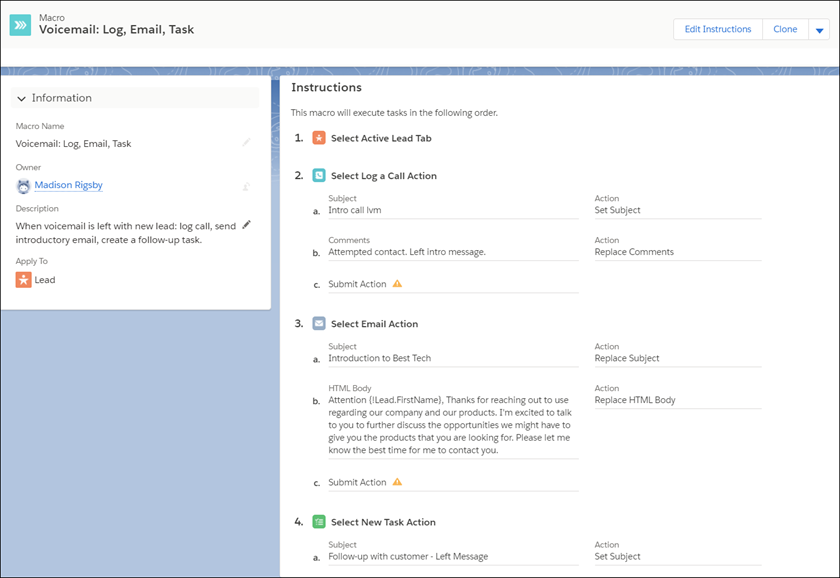
Macro Name: Voicemail: Log, Email, Task
Description: When voicemail is left with new lead: log call, send
introductory email, create a follow-up task.
Apply To: Lead
Add instructions to log the call.
Click Edit Instructions.
From the sample page on the left side, click the Activity
tab, and then click the Log a Call subtab.
Click the Subject field. In the Instructions tab, enter
Intro Call LVM as the subject.
Click the Comments field. In the Instructions tab, enter
Attempted contact. Left intro message. as the comment.
Click Save. The Instructions tab shows Submit Action.
Add instructions to send an email.
Click the Email subtab.
Click the Subject field. In the Instructions tab, enter
Introduction to Best Tech as the subject.
Click the body. In the Instructions tab, for the HTML body, enter
Attention {!Lead.FirstName}, Thanks for reaching out to us regarding our
company and products. I'm excited to discuss opportunities to give you the products
that you are looking for. Please let me know the best time to contact
you.
Click Save. The Instructions tab shows Submit Action.
Add instructions to create a follow-up task.
Click the New Task subtab.
Click the Subject field. In the Instructions tab, enter
Follow-up with customer: Left Message as the subject.
Note
The macro doesn’t allow you to set a due date for the task. The sales rep must enter the due date
when they’re assigned the task.
We use three kinds of cookies on our websites: required, functional, and advertising. You can choose whether functional and advertising cookies apply. Click on the different cookie categories to find out more about each category and to change the default settings.
Privacy Statement
Required Cookies
Always Active
Required cookies are necessary for basic website functionality. Some examples include: session cookies needed to transmit the website, authentication cookies, and security cookies.
Functional Cookies
Functional cookies enhance functions, performance, and services on the website. Some examples include: cookies used to analyze site traffic, cookies used for market research, and cookies used to display advertising that is not directed to a particular individual.
Advertising Cookies
Advertising cookies track activity across websites in order to understand a viewer’s interests, and direct them specific marketing. Some examples include: cookies used for remarketing, or interest-based advertising.