
You are here:
Draft a Sales Email with Einstein Generative AI
Use the power of Einstein to crush that next email. Einstein pulls in a contact’s name and info to customize your email. But unlike a static template, Sales Emails creates a new, personalized output every time.
Required Editions
| Available in: Lightning Experience |
| Available with the Einstein for Sales add-on, which is available for an extra cost in Performance and Unlimited Editions. |
| User Permissions Needed | |
|---|---|
| To send sales emails using Einstein generative AI: | Einstein Sales Emails Permission Set |

Note
The language used to write the prompt instructions or any response language requested in the instructions doesn’t determine the output language. Instead, the execution logic determines the language used in the response. Learn how the output language is determined.
-
You can use Einstein to create emails in Salesforce and in Salesforce email integrations
for Outlook and Gmail.
- In Salesforce, open the email composer anywhere in Lightning Experience.
- In Gmail or Outlook integrations, locate the Einstein Sales Emails component in the email application pane.
- Enter a recipient with a contact or lead record in Salesforce, where the record has an email address.
-
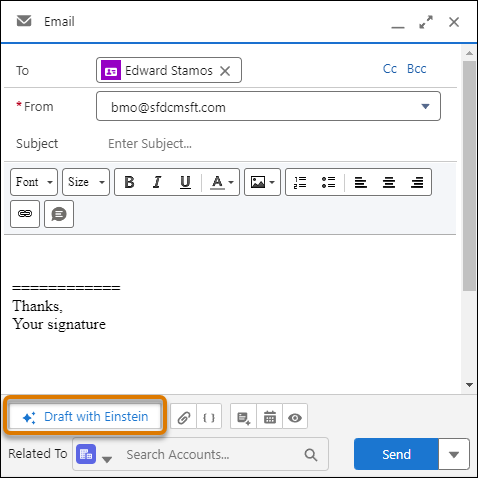
Click Draft with Einstein.
- Decide whether to use pre-made email instructions or create your own.
- Review and send the email.

- Use Pre-Made Email Instructions to Draft a Sales Email
Ask Einstein generative AI to draft some of your most common types of emails, such as introductions and follow-up nudges. Like email templates, Einstein pulls in a contact’s name and information to customize your email. But unlike a static template, Einstein creates personalized output every time. - Best Practices for Sales Email Prompt Templates
Conside these best practices to get the most out of your sales email prompt templates. - Use Einstein and Personal Email Instructions to Draft a Sales Email
Use your own instructions with Einstein generative AI to draft your sales emails. Like email templates, Einstein pulls in a contact’s name and information to customize your sales email. But unlike a static template, Einstein creates unique, personalized output every time. - Control If Users Can Enter Their Own Sales Email Prompt Instructions
Salesforce admins can control if anyone can enter instructions for Einstein to use in creating a unique draft email. This feature is on by default. - What’s the Difference Between Sales Emails and Agentforce?
Sales reps have a choice of tools when creating emails. Determine which tool is best to meet your goals, and learn how to use generative AI in the flow of work.
Did this article solve your issue?
Let us know so we can improve!
